Droip Review: The Next Gen Website Builder for WordPress

Introduction
For years, WordPress website building has been stuck on repeat. The same rigid solutions. The same limitations. The same compromises.
Now, most people are simply settling, trading flexibility for convenience. And when these tools don’t deliver, they’re forced to wrestle with complex code, pile on endless plugins, or simply shelve ideas altogether.
But why settle for “good enough” if you can build without limits? Because that’s exactly what the Droip Website Builder promises!
So, in this review, we’ll be pitting Droip against today’s most popular website-building tools to see exactly how it stands out from the rest, comparing its:
- Features
- Output performance
- Pricing and plans
- Ease of use
- And more
What Is Droip?
Droip is a truly no-code website builder here to do a complete 180 on how users build websites in WordPress.
With its drag-and-drop editor, granular control, and an incredible lineup of native features, the platform redefines what you can achieve with no-code.
Whether you’re a seasoned developer, total beginner, or somewhere in between, Droip lets you build the website of your dreams visually with ease.
Plus, you won’t even feel the need for extra plugins with Droip. From building dynamic websites, making them responsive for any device, to collaborating seamlessly with your team, and more, the no-code website builder can handle it all on its own.
What Makes Droip Different?
While most WordPress website builders stick to block-based layouts, Droip gives you a visual, freeform canvas and full creative freedom to place elements exactly where and how you want them.
And unlike other platforms that offer surface-level control and have limited no-code capabilities, Droip, with its atomic design approach, lets you get down to the nitty-gritty details of your design.
But Droip doesn’t stop just there.
As mentioned earlier, Droip is a one-stop solution, packed with powerful capabilities that eliminate the need for extra plugins, with:
- Growing library of WordPress theme templates
- Dynamic Content Manager
- Instant Figma to WordPress handoff
- Real-Time Collaboration With Co-Editing, Comments, Versions, and more
- Form Builder and Data Manager
- Pop-up Builder
- Visual Interaction Builder
- And beyond
Best of all? You get all of this in one subscription with no hidden costs and at a fraction of the price of other platforms offering far less in return.
Exploring the Features
Now, let’s take a closer look at the powerful features Droip offers to find out if it truly lives up to its claims.
Intuitive Visual Drag & Drop Editor
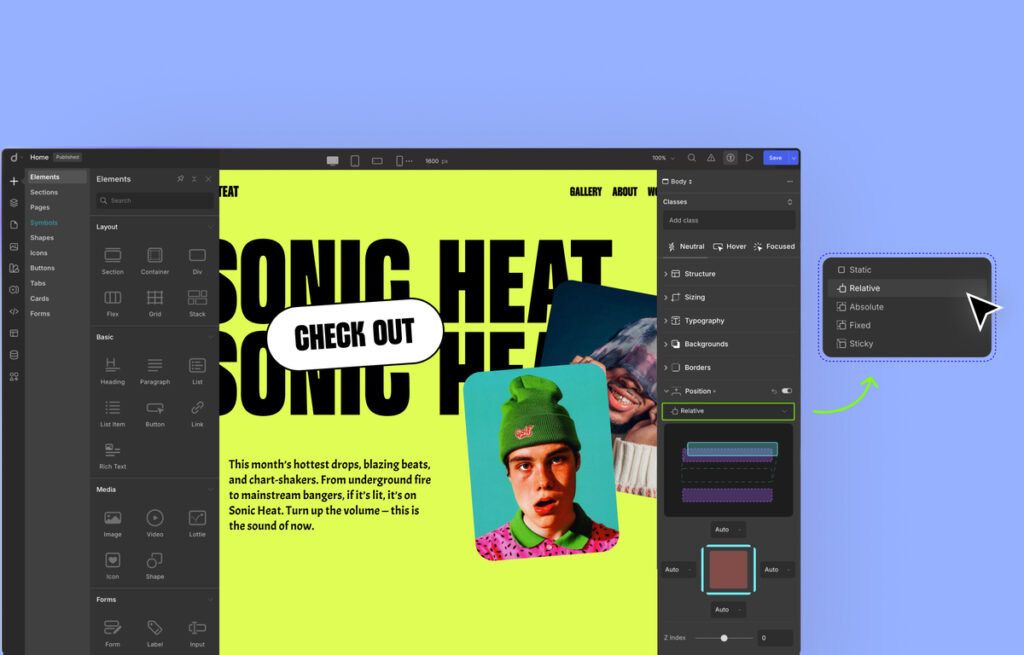
Droip’s visual drag & drop editor feels familiar and intuitive. Featuring a sleek UI and everything within easy reach, it’s designed to streamline the website-building workflow.
There’s also, of course, its free-flowing canvas which allows for flexible design. Teamed with Canvas Control options like View Guides, Ruler, and more, you can craft pixel-perfect websites with ease.
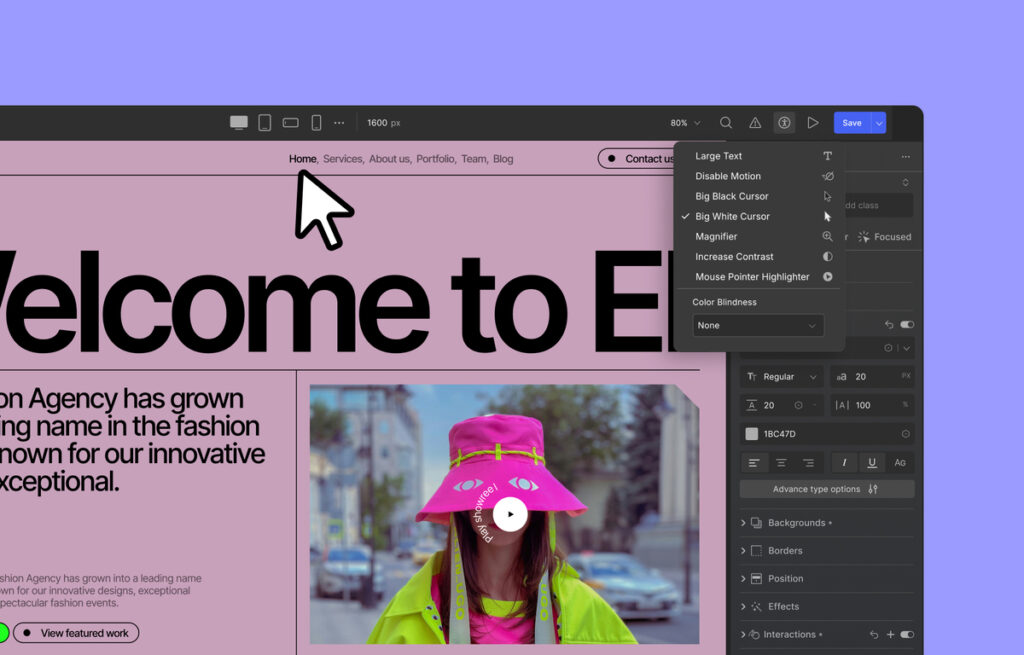
Droip also includes built-in Accessibility features that let users tailor the interface to their needs, ensuring everyone can build websites comfortably and confidently.
And speaking of comfort, the platform also offers Light and Dark modes, so users can design with ease at any hour.
Instant Figma to WordPress Handoff
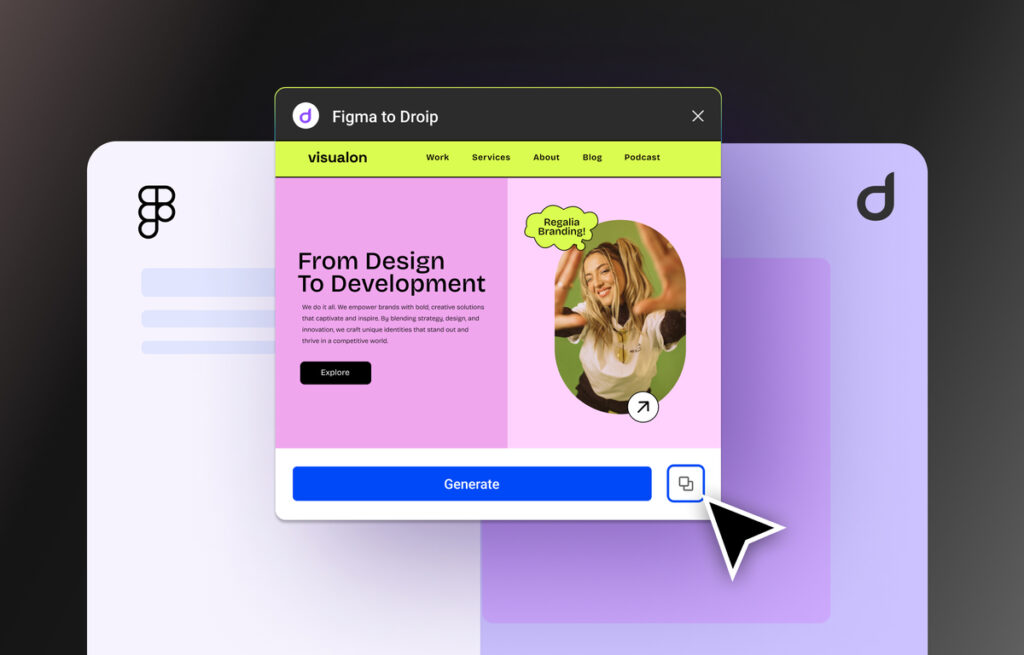
With Droip’s native Figma to WordPress handoff tool, you no longer need developers to manually convert your Figma design to development in WordPress with code.
Instead, all you need to do is access your design on Figma, generate & copy using the tool, and paste it into Droip.
Just like that, you can go from design to development with pixel-perfect accuracy and auto-responsiveness instantly.
From there, it’s just a matter of adding functionality and fine-tuning the details with Droip, and you’ll be ready to hit publish!
Extensive Template & Component Library
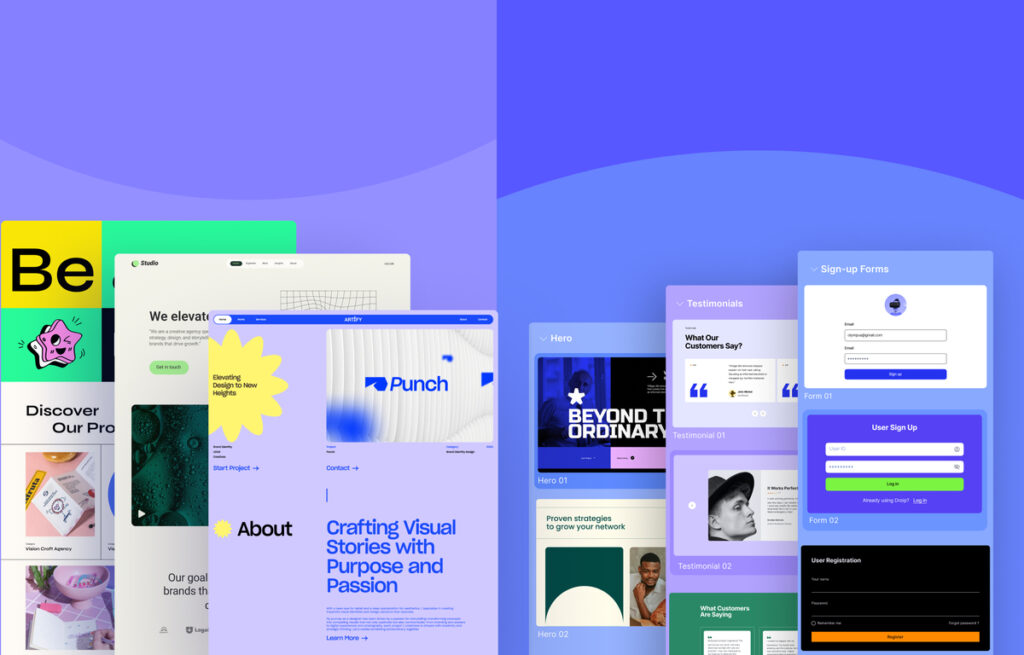
Don’t have a design and unsure where to begin? Droip’s got you covered with a variety of pre-designed options to help you get started.
First up, we have Droip’s growing library of WordPress Themes. Whatever your niche may be, you’re sure to find a template that fits, complete with all the essential pages. Plus, they’re fully customizable in Droip so you can tailor them as you like to fit your brand perfectly.
That’s not all. Every template is responsive, dynamic, and endlessly scalable. That means you can launch a polished website in no time and have it grow seamlessly right alongside your brand.
The best part? With a single Droip subscription, you get unlimited access to the entire theme library at no additional cost.
And if full templates with multiple pages feel overwhelming or you simply want more creative freedom while still starting with a solid base, Droip also offers a range of Pre-built Pages, Sections, Wireframes, and Components to mix, match, and make them your own.
Reusable Design With Symbols
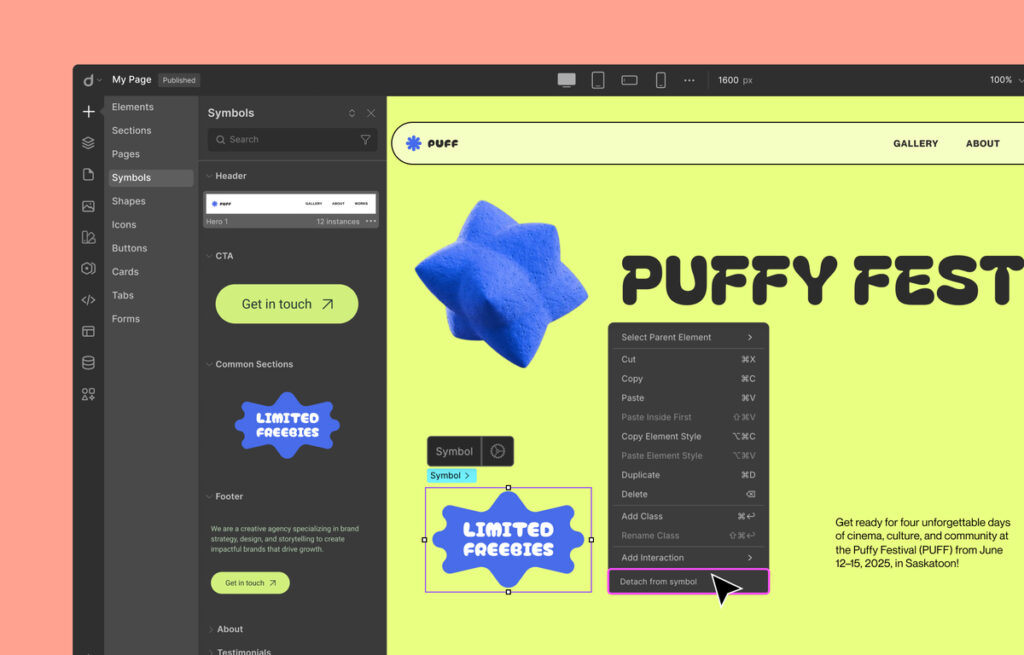
Speaking of pre-built components, Droip’s Symbols make it easy to save any design and reuse it anywhere in the site.
And unlike other website builders, you don’t have to waste time manually updating each one individually when you make changes. Instead, in Droip, simply update the main Symbol instance once and have the adjustments automatically reflected everywhere!
But if you do need to tweak just one instance’s content, you can do that directly by double-clicking it. And if you want to adjust the design of only one instance, you can simply detach it from the Symbol.
In essence, Symbols in Droip makes website building super website becomes more efficient and effortlessly consistent.
Global Styling with Variables
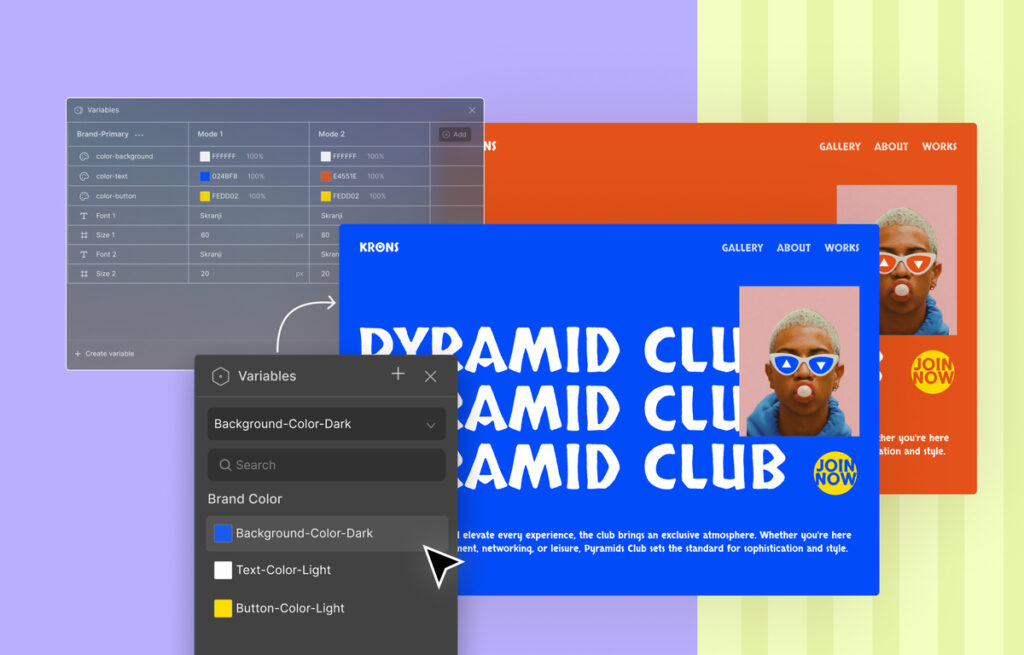
One of the keys to getting your audience to take you seriously is maintaining website design consistency.
And the best way to achieve that is by setting global styles. In Droip, this is easily done using Variables.
From colors and font styles to sizes, define as many global styles as you need, then apply those variables across your entire site for truly synchronous global styling, i.e., change the value of a Variable once and this update is reflected everywhere it was applied.
You can even create variations, called Modes, for Variables, which come in handy if you want to offer light & dark modes to elevate user experience, instantly roll out a festive look, and more.
Built-in Dynamic Content Manager
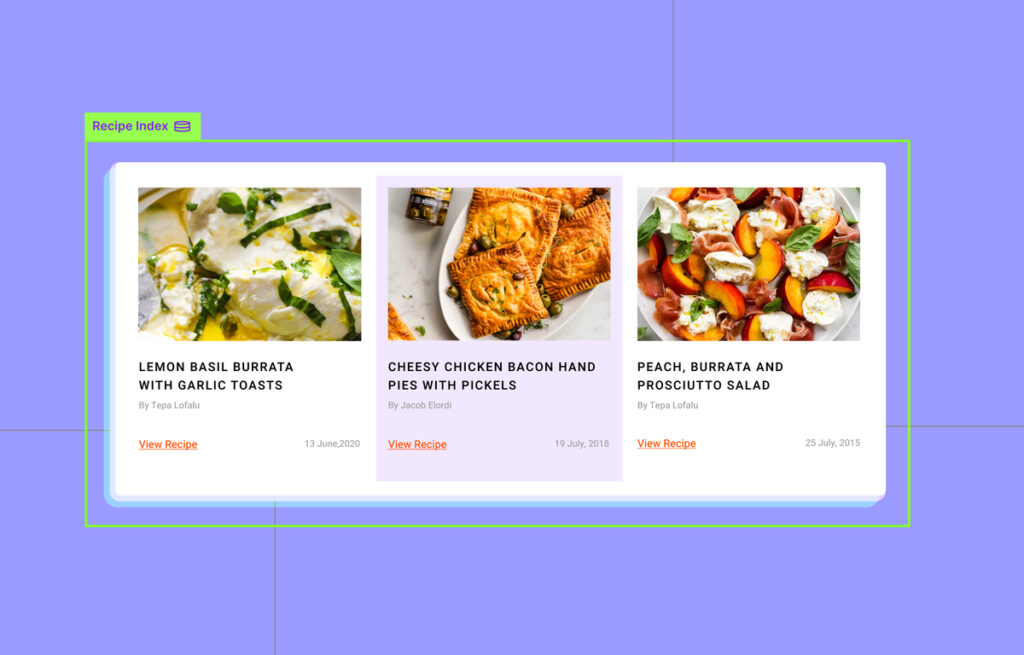
Unlike other website builders that rely on third-party content management systems, Droip comes with a powerful Dynamic Content Manager built right in.
This means creating custom content types and building dynamic websites is not only possible but effortless.
From showcasing dynamic listings using the Collection element and designing dynamic single-page Templates for individual items to connecting related content using References, Droip’s Content Manager gives you the flexibility and control that rivals dedicated CMS tools such as ACF.
Blogs, Online Portfolios, Service Sites, no matter what kind of dynamic site you’re building, Droip makes it effortless.
Advanced Interactions and Animations
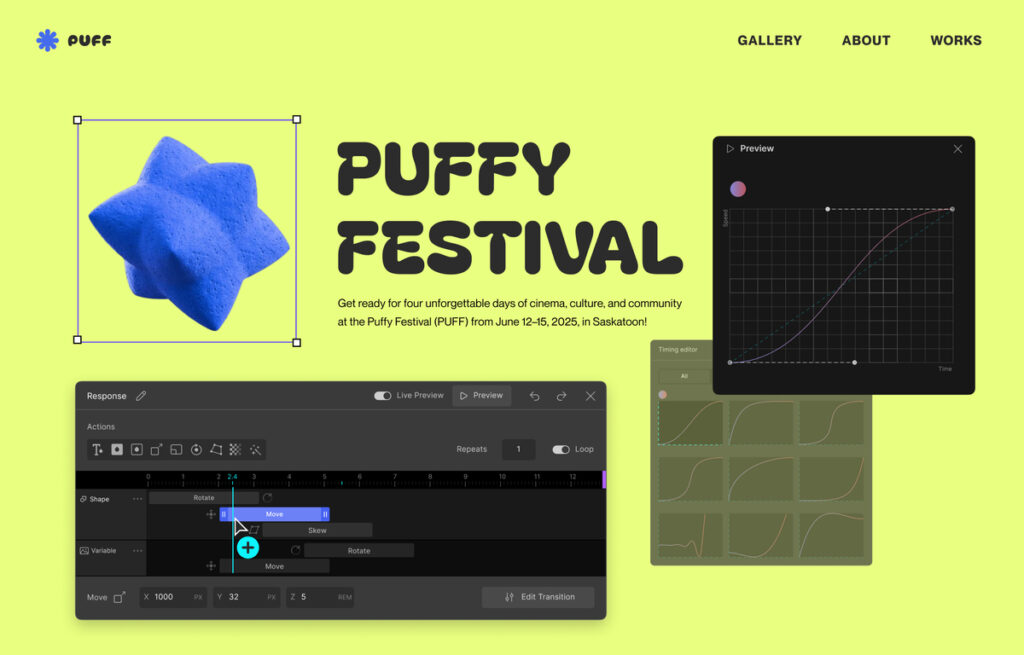
When it comes to website interactions and animations, Droip offers plenty of options and endless control.
If you want something quick, pick a preset option from the Interaction Animation Library.
For more complex interactions, the Visual Interaction Builder is your best bet. With multiple on-element or on-page trigger options, the ability to target several elements in one response, the freedom to layer multiple actions however you like, and more, you can create truly unique interactions — visually.
And that’s not all. You can fine-tune the progress of every action down to the millisecond using the Custom Timing Editor.
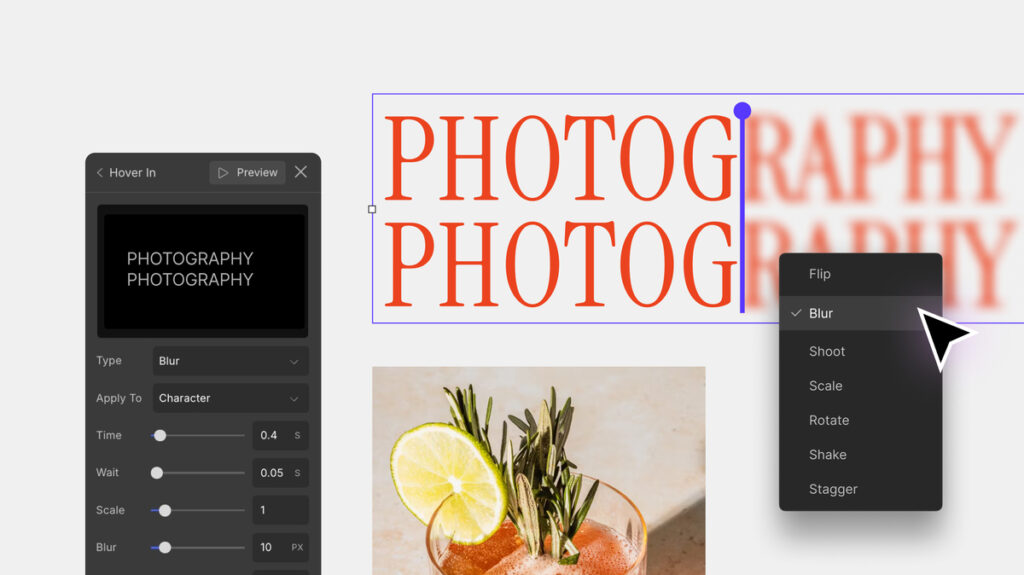
Lastly, we’ve got Text Animation, which lets you bring your website text to life instantly, adding dynamic flair with just a few clicks.
Unlimited Breakpoints
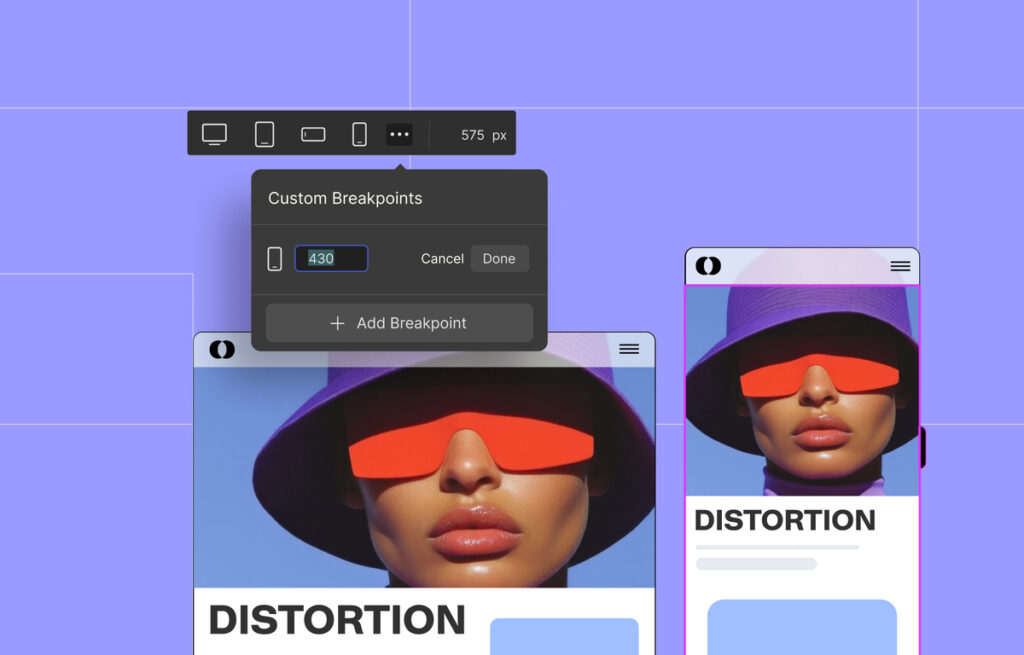
No website design is truly complete until it’s fully responsive. Fortunately, you can easily do this using Breakpoints in Droip.
Different from typical website builders, Droip offers unlimited custom breakpoints, letting you tailor your design perfectly for any device.
What’s more, thanks to its smart cascading system, adjustments made on larger screens automatically carry over to smaller screens. This means you won’t have to repeat the same changes again and again, as well as ensuring consistency.
Plus, as it’s a visual website builder, you can see the changes happen in real-time, and seamlessly switch between breakpoints to fine-tune your design.
Real-Time Collaboration and Co-Editing
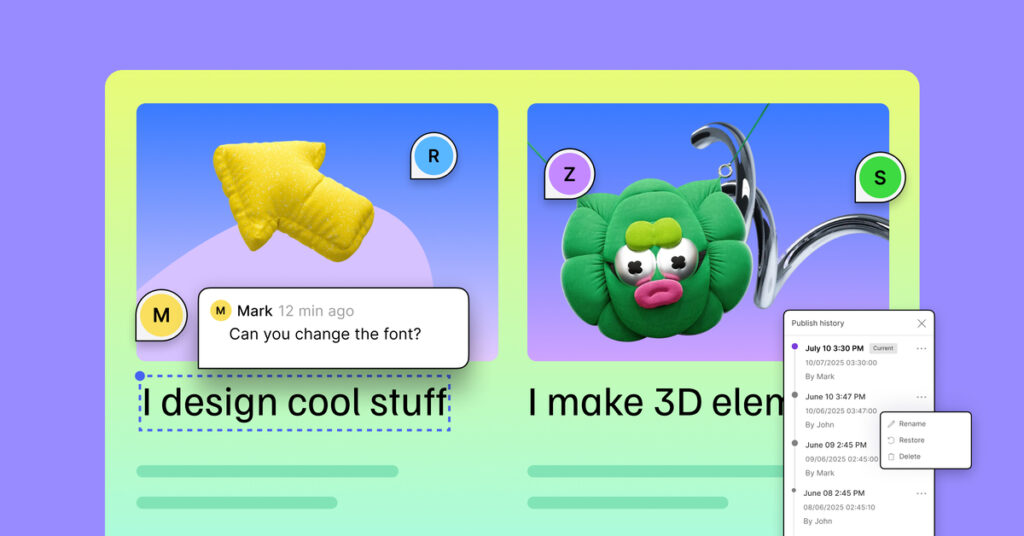
If you’re working with a team, you’ll be glad to know that Droip supports Real-time Collaboration with multiple users co-editing at a time on the same page.
Communication is smoother too, thanks to Droip’s built-in in-canvas Comments, which let you leave feedback and share ideas right within the editor.
Droip also gives you full control over your publish history with Versions. Every time someone hits publish, a new version is saved. So you can view, manage, and restore any version whenever needed. Whether you want to undo a change, fix an issue, or rethink a design, rolling back is effortless and seamless.
Lastly, Droip’s Project Export-Import feature also makes sharing design files among team members quick and easy, further streamlining collaboration.
Other Noteworthy Features
We’ve gone over the major features, but Droip offers even more tools to streamline website building, like:
Role Manager
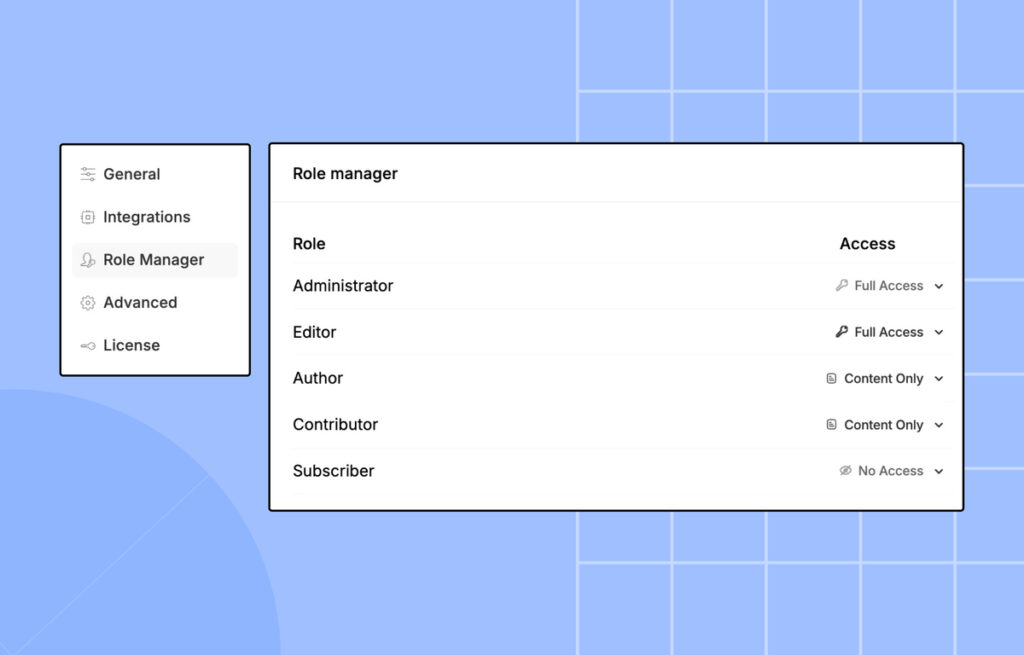
As a security measure, not everyone should have the same level of access to a website.
In Droip, this is easily managed with the Role Manager, where you can assign different levels of access to different roles and then assign those roles to the appropriate users.
This ensures users only have the permissions they need, safeguarding your website’s security and sensitive data without disrupting user workflows.
Visitor End Accessibility Features
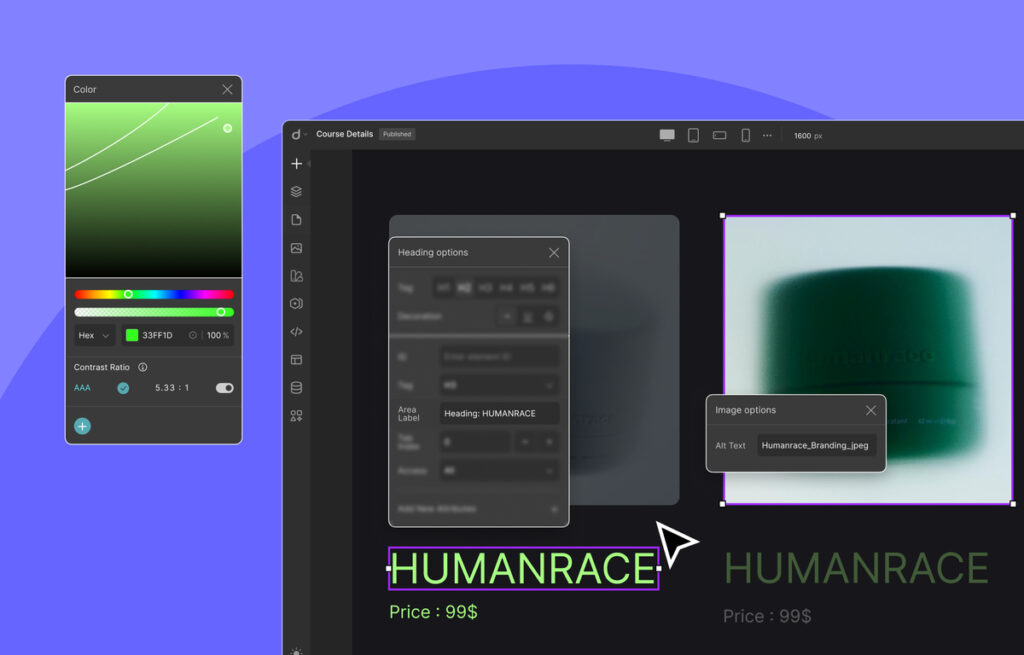
Droip doesn’t just provide accessibility options for its users to customize the editor (as discussed earlier) but also includes features that make the websites you create more accessible to visitors.
For instance, the Color Contrast Checker helps ensure your text is always readable against background colors.
And by adding Alt Text to Images, you can make sure your visual content is screen-reader friendly as well as set Area Labels for elements so they’re clearly identified by assistive technologies.
Integration via Droip Apps
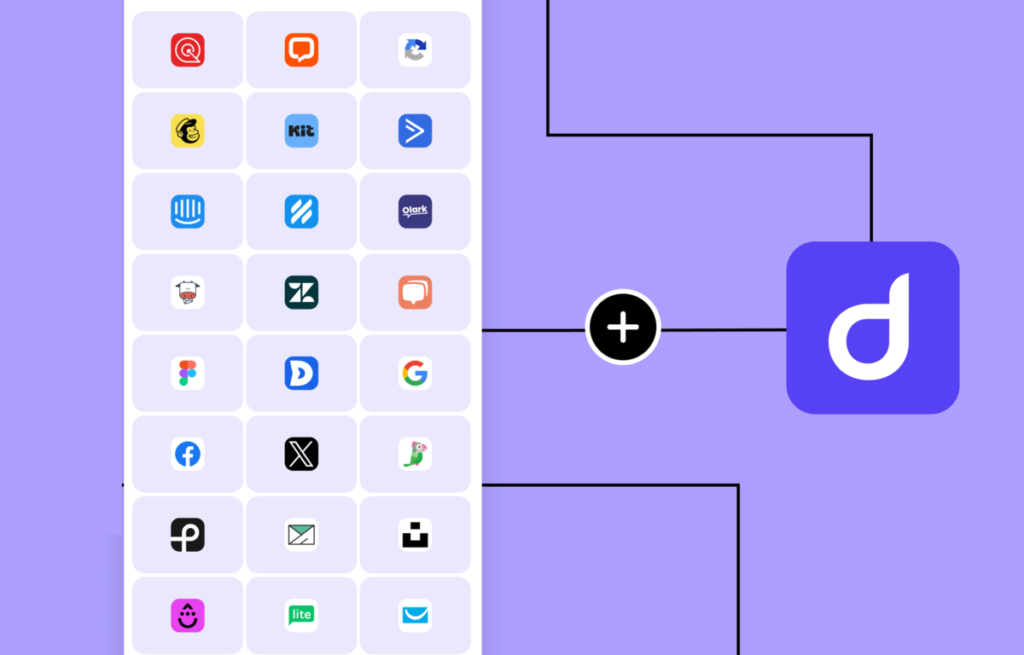
No more wasting precious time looking for the right plugins and stressing over their compatibility. Instead, you can easily add even more capabilities to your website by integrating via Droip Apps!
From live chat widgets to automated email marketing tools and more, you’ll find all the right integrations within the builder.
With just a few clicks, you can connect with industry favorites such as Mailchimp, MailerLite, Google Login, Facebook Login, LiveChat, Zendesk, and more.
Clean & Performance Optimized Output
Droip is all about building quality websites. Unlike its counterparts, it’s designed to deliver clean, bloat-free code output.
Plus, with auto-compressed CSS and JavaScript and a lack of dependency on third-party JavaScript libraries, websites built with Droip load faster, run smoother, and rank better on SERPs, right off the bat.
To see it in action, let’s take a very simple website design.
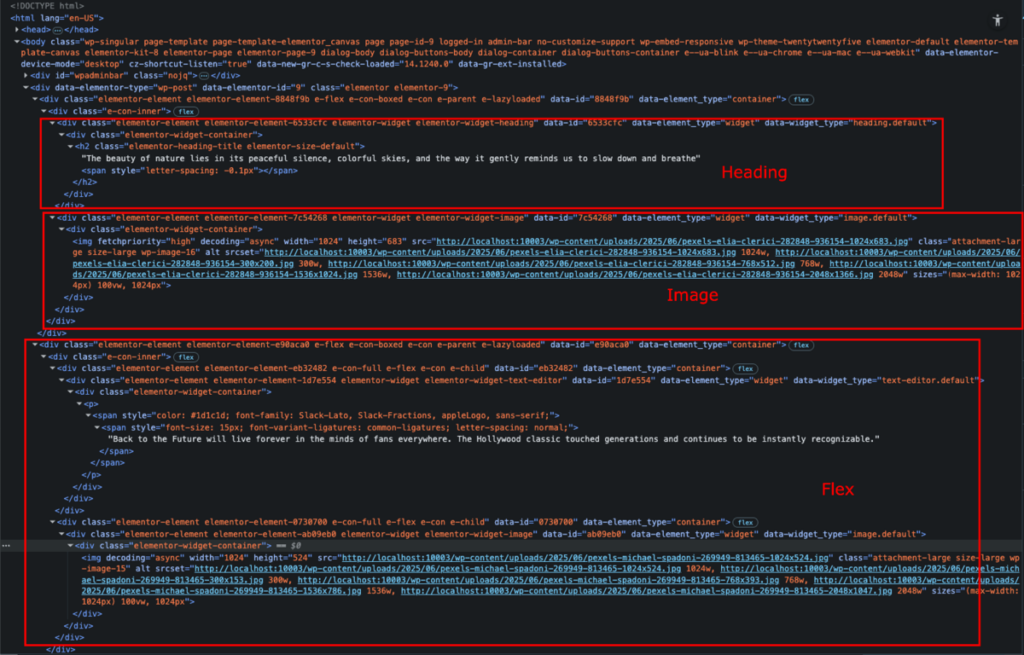
When created in Elementor, this is what the code output looks like.
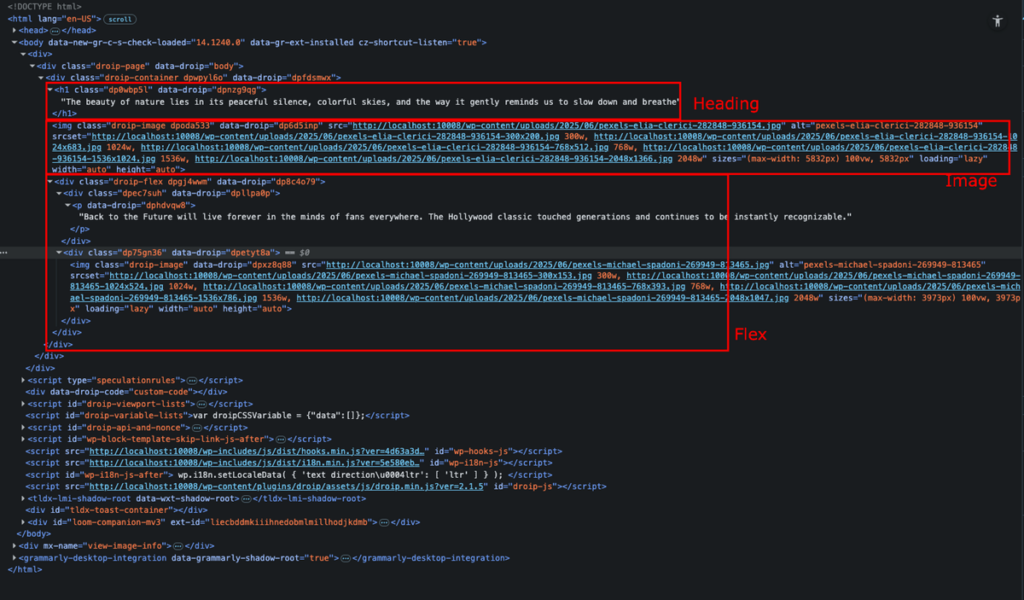
In comparison, when the same design is recreated in Droip, the code is clean and bloat-free, with only what is essential.
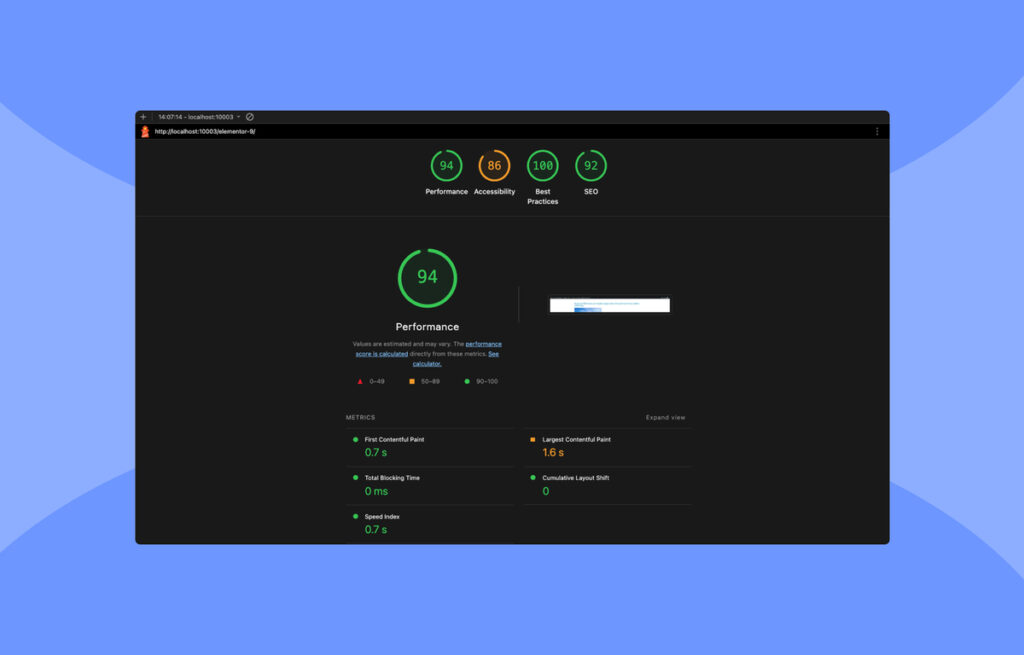
Next, it’s time to compare the performance. For accuracy, we ran tests using the Lighthouse tool under identical conditions — both sites were built with a WordPress clean setup and the default Twenty Twenty-Five theme.
Elementor
Droip
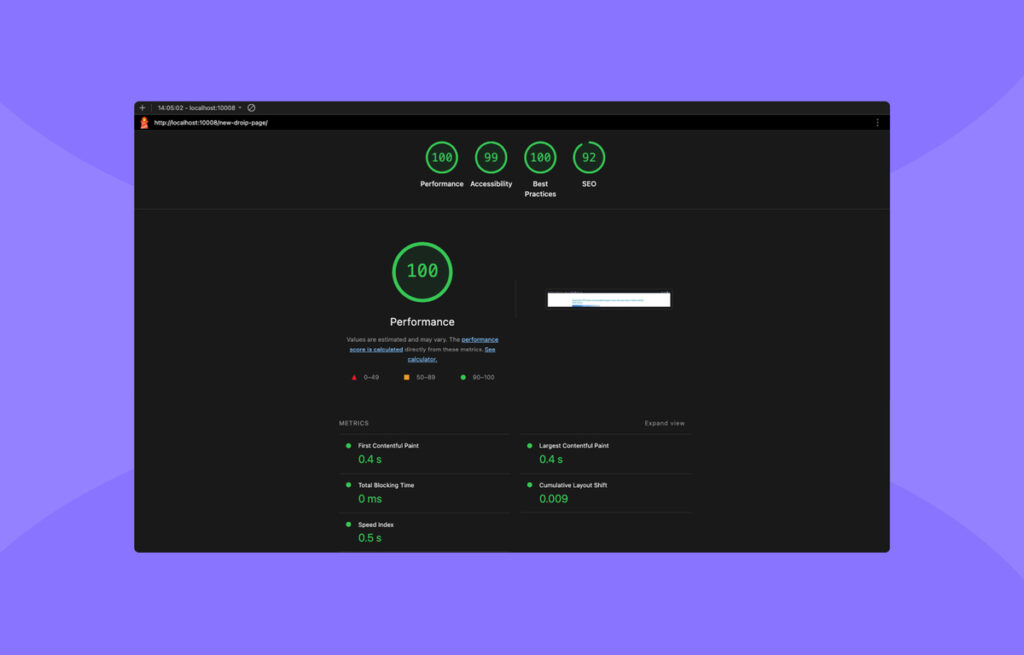
The difference is clear. Elementor’s bloated code slows things down while Droip’s clean code structure results in a noticeably faster website.
You can also enable Image Optimization in Droip, which automatically converts PNGs, JPGs, and other uploaded image formats to WebP, a format with superior compression without loss of quality for even faster load times.
Who Is Droip Best For?
Droip is built to handle it all, so it begs the question — who is it best for?
The short answer: absolutely everyone.
As a beginner-friendly, fully no-code platform loaded with resources, Droip lets you build any website, from the simplest single-page websites to complex, dynamic multi-page projects with no coding required.
Designed to be accessible for all, it’s got tools that cater to everyone.
For teams and agencies, Droip offers built-in Collaboration tools, including real-time co-editing, to streamline workflow.
While freelancers can keep clients in the loop through Share View-Only links, making progress reviews and feedback effortless.
No matter your role or technical skill level, Droip gives you everything you need to create professional, high-performing websites quickly and effortlessly.
Pricing: What Does Droip Cost?
Droip’s flexible pricing tiers offer something for everyone, whether you’re a freelancer, part of a growing team, or a large-scale enterprise.
Starting with the annual plans, we have:
Starter: Perfect for individuals and startups, this plan covers a single site license and includes every Droip Pro feature, giving you the full Droip experience with zero compromises.
Growth: Ideal for expanding teams, this plan also includes all the Droip Pro features as well as unlocks access for up to 10 sites.
Scale: The go-to plan for agencies and large enterprises, this tier offers the complete Droip Pro toolkit and unlimited site licences.
Or, you can go all-in with:
The Ultimate plan, which offers the complete Droip Pro experience, unlimited websites — for a lifetime!
Looking at these plans, do you notice something special? That’s right. Unlike many other WordPress website builders, all Droip Pro plans include the entire feature set, no gated tools, and no surprise charges!
Just take the starter plan, for instance — only $69/year for the same powerful tools you’d get in higher tiers, just with a difference in the number of sites and license duration.
Many builders charge more for less, but with Droip, you get everything from day one.
How to Get Started With Droip
To get started with Droip, create an account on the Droip website.
Next, from the pricing page, select a plan that fits your needs best and complete your purchase.
After purchasing, download the Droip plugin from Subscription > Downloads.
Next, from your WordPress site’s backend, go to Plugins > Add New > Upload Plugin. Select the file you just downloaded, then click Install and Activate.
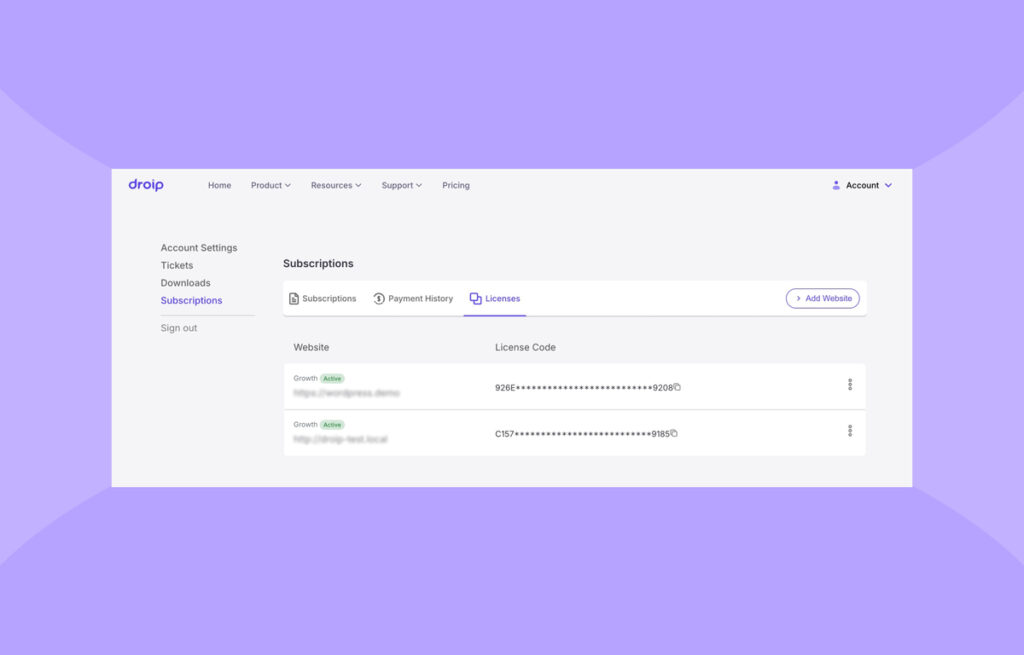
Finally, activate your license. Head back to the Droip website and go to Subscriptions > License to add your site and copy the license key.
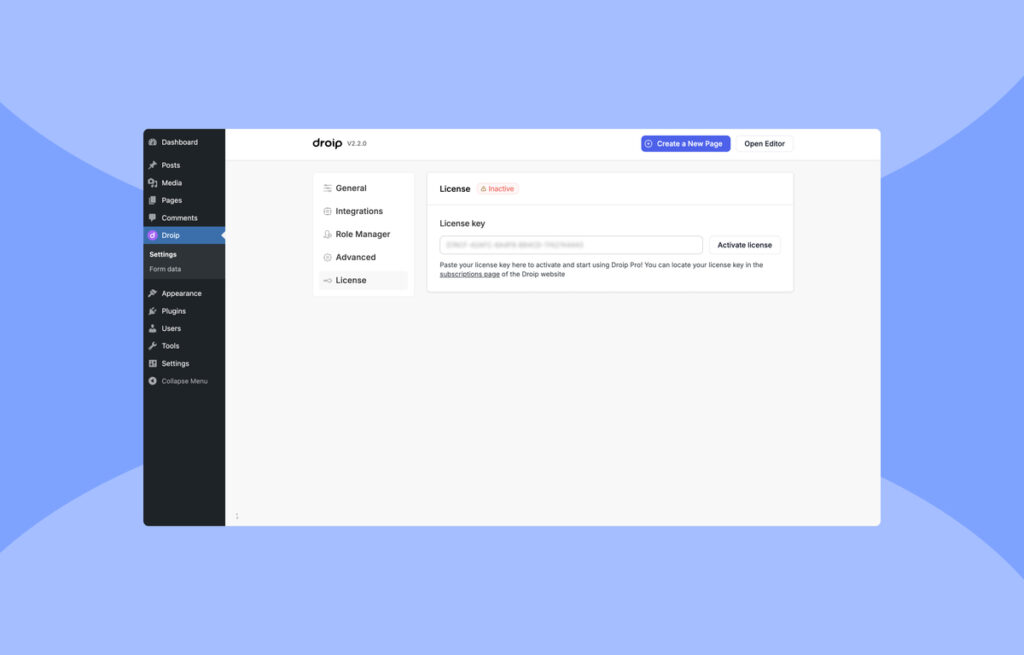
Then, go to WP Admin > Droip > License, paste it, and hit Activate License.
Now, you’re all set to begin building your website with Droip. You can get started in a few different ways:
- Importing an existing design from Figma to WordPress instantly using the Figma to Droip tool.
- Choosing one of the ready-made Templates from Droip’s ever-growing library.
- Mixing and matching premade Pages, Wireframes, Sections, and Components.
- Or starting from scratch on a blank Canvas.
To learn more, check out the Droip Basics playlist on YouTube and our Getting Started documentation.
What Customers Are Saying
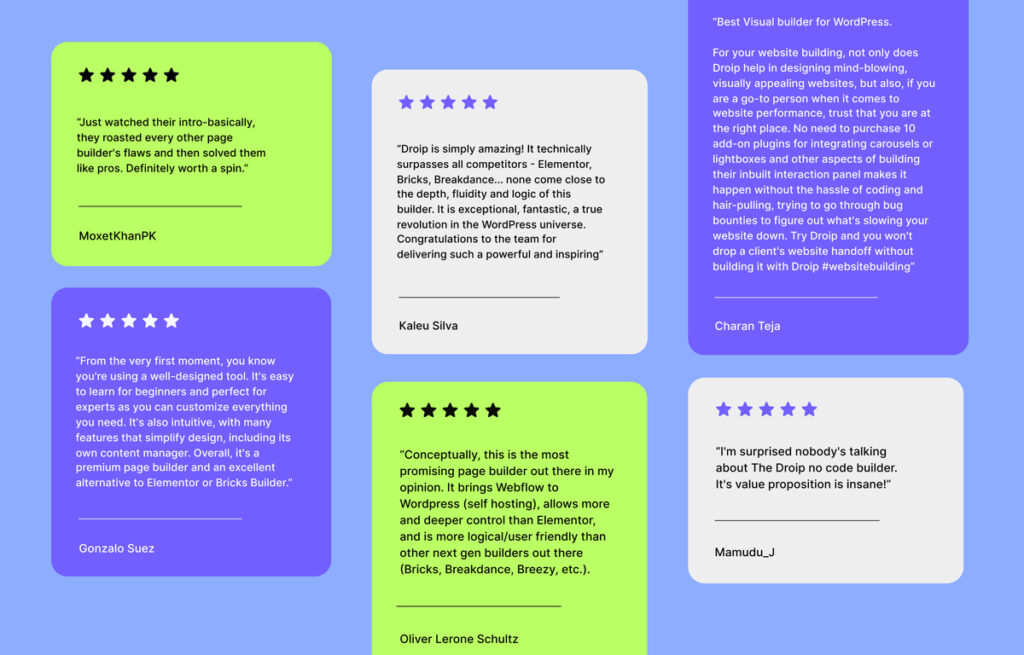
We’ve shared plenty about what Droip can do, but now it’s time to hear it straight from the source. Here’s what real users with hands-on experience have to say about building websites with Droip!
Final Verdict: Is Droip Worth Using?
Droip stands out as a versatile, all-in-one WordPress website builder that delivers powerful capabilities without the headaches of complex coding.
Whether you’re a seasoned pro or a total beginner when it comes to website building, using Droip, the entire process becomes effortless with instant Figma to WordPress import, a growing library of Templates, built-in Dynamic Content Manager, Real-time Collaboration tools, and so much more.
Plus, its lack of reliance on third-party plugins and no hidden costs make it an excellent choice for anyone looking to build dynamic and scalable websites without breaking the bank.
So if you want a modern, one-stop solution that challenges the limits of what’s possible with no-code, the Droip WordPress website builder is it.
