
AI Music Agent: SongAgent’s Text / Lyrics to Song Feature

If you’ve got lyrics sitting in a notes app, or just a rough idea for a song, turning that into an actual track usually means finding a musician, learning production software, or both. That gap between words and finished music is exactly what an AI music agent is built to close.
SongAgent, an ai song agent designed for both hobbyists and working creators, includes a Text / Lyrics to Song feature that turns written lyrics or simple text prompts into a full track. This guide covers what the feature actually does, how it fits into SongAgent, and how to use it step by step.
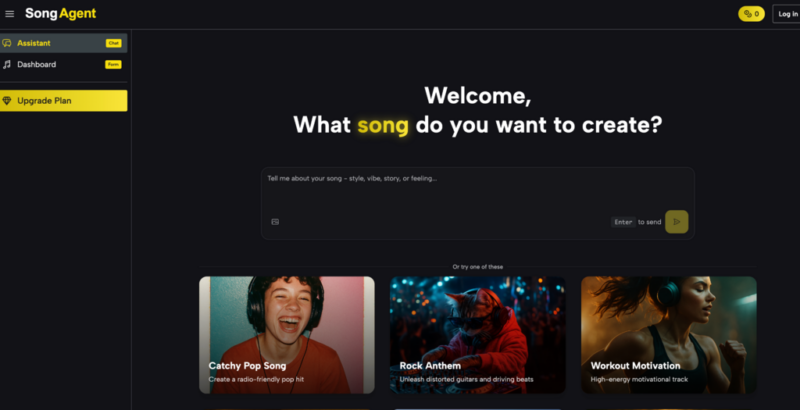
What Is Text / Lyrics to Song?
This feature is the entry point into SongAgent’s music generation: it takes text — either full lyrics you’ve written or a short description of what you want — and turns it into a composed song. It’s built around two approaches, giving you the choice between detailed control and quick generation depending on what you already have ready.
For songwriters, this means finished lyrics don’t have to stay unfinished. For creators without a musical background, it means a rough idea or a set of keywords is enough to start producing something usable, without needing to write music or play an instrument.
Traditional Challenges of Text / Lyrics to Song
Turning written words into a finished song has traditionally required several things most people don’t have on hand:
- Access to a composer, producer, or musician to build the arrangement
- Enough music theory knowledge to set melody, key, and structure
- Studio time or recording equipment for vocals and instrumentation
- Software with a steep learning curve for arranging and mixing
- Significant time between a finished lyric and a finished song
These barriers are a big reason creators look toward AI-based tools. Instead of coordinating people and equipment, an AI approach can take text as direct input and handle composition, arrangement, and vocals in one pass, closing much of the gap between having an idea and having something you can actually listen to.
How SongAgent Handles Text / Lyrics to Song
Custom Mode
Custom Mode gives full control over the song’s lyrics, title, and style, making it suited to songwriters who already have specific words or a clear direction in mind and want the generated track to follow that closely.
Simple Mode
Simple Mode works from keywords instead of full lyrics, generating a matching track based on a short description. It’s a faster path for creators who have an idea of the mood or theme but haven’t written out lyrics themselves.
AI Lyrics Generator
For those without lyrics yet, the AI Lyrics Generator can turn a theme or concept into full lyrics aligned with a chosen mood and style, which can then feed directly into the song generation process.
Output & Usage – Ready for Real Content
Generated tracks are available as MP3, with WAV format offered on paid tiers for higher-quality use. This makes the output suitable for videos, podcasts, and other creative or promotional projects. Commercial usage rights are generally tied to paid plans, while free-tier tracks are intended more for personal use, so it’s worth checking your plan’s terms before publishing anything.
How to UseText / Lyrics to Song
Step 1 – Prepare Input
Decide whether you’re starting with full lyrics or just a general idea. If you have lyrics, have them ready to paste in as-is. If you’re starting from a concept, a short description of the mood, theme, or genre is enough to work with.
Step 2 – Configure Settings
Choose Custom Mode if you want the song built around your specific lyrics and style choices, or Simple Mode if you’d rather generate from keywords. As you set up your track, it helps to think about how this fits into your wider AI song agent workflow, especially if you’re planning multiple songs.
Step 3 – Generate & Export
Start generation once your input and settings are set. Preview the resulting track, and if it’s close but not quite right, you can adjust and regenerate. Once you’re satisfied, download the track in the available format and use it in your project according to your plan’s terms.

Use Cases for Creators
- Songwriters — Turn finished lyrics into a full musical arrangement without needing to find a producer or composer.
- Short-Form Video Creators — Generate quick, mood-matched tracks from a short description for use in social content.
- Podcast Hosts — Build original intro or theme music from a simple text prompt instead of licensing stock audio.
- Hobbyist Musicians — Use keyword-based generation to explore musical ideas without needing music theory knowledge.
FAQ
How does the Text / Lyrics to Song workflow actually work?
You provide either full lyrics or a short text description, choose Custom or Simple Mode, and the system generates a composed track based on that input. You can preview the result and regenerate if adjustments are needed.
Can I use the generated song commercially?
That depends on your plan. Paid tiers generally include commercial usage rights, while tracks made on the free tier are intended more for personal use. Checking the terms tied to your specific plan is the safest way to confirm before publishing.
Does this feature support different languages or genres?
The feature is built to work across a range of styles and moods, from pop to acoustic to electronic, giving creators flexibility whether they’re working from detailed lyrics or a brief keyword prompt.
Conclusion
Text / Lyrics to Song addresses one of the more common blockers in the broader ai song generator process: having words or an idea but no way to turn them into music. By offering both a detailed, lyrics-first mode and a faster keyword-based mode, it gives creators a practical starting point regardless of how much they already have written.
If you’ve got lyrics or even just an idea sitting unused, it’s worth trying this feature on SongAgent to see it turned into an actual track.