
How to Connect Your WooCommerce Store With Modern Warehouse Operations

Running a WooCommerce store gets busy fast, especially once orders start coming in every day and your smart warehouse setup has to keep pace. If your team is still juggling inventory updates, packing slips, and shipping labels by hand, you already know how messy that gets.
A clean warehouse connection can save time, cut down on order mistakes, and make your store easier to manage. It also gives you a better grip on stock, so you know what is available before a customer clicks “buy.”
Why This Connection Matters
WooCommerce is great for selling, but it does not handle every warehouse task on its own. Once your orders move past a small scale, the gap between your storefront and your warehouse starts to show.
That gap can create problems. A product may sell after stock is already gone, a shipment may sit too long, or a team member may retype the same order details twice.
When that happens, you lose time and customers notice. The fix is not more manual work. The fix is a cleaner setup between your store and your warehouse system.
Step 1: Map the Full Order Path
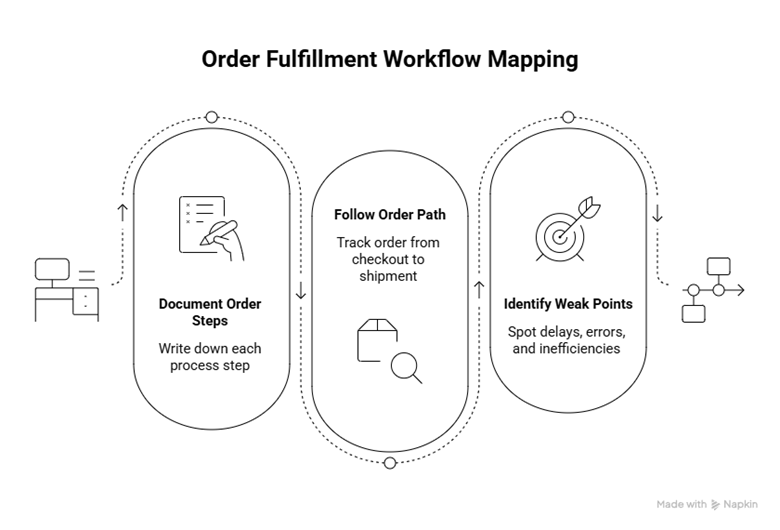
Start with the basics. Write down what happens after a customer places an order, then follow that order from checkout to shipment.
Look at every step, from payment confirmation to picking, packing, label printing, and dispatch. Make note of where information enters the process and where someone has to copy it into another system.
This is the part many store owners skip. They jump straight to software before they understand the workflow, and that usually leads to confusion later.
Once you map the process, you can spot the weak points (delayed spreadsheets, miscalculated stock in locations, etc.).
Step 2: Choose the Right Warehouse System
Choose a system that works well with WooCommerce and fits the way your business runs. At a minimum, look for inventory sync, order import, shipping updates, and barcode support if your team uses scanners.
You do not need the fanciest setup on the market. You need one that your team can use without a fight every morning.
If your store is small, keep the setup simple. A tool with fewer moving parts is often easier to manage and less likely to create problems when orders start piling up.
Step 3: Match Products and Stock Records
Before you connect anything, check your product data. This is where many integrations go wrong, because the store and warehouse often use slightly different labels for the same item.
Make sure each WooCommerce product has a clean SKU that matches the warehouse system. Do the same for product variations, bundles, sizes, colors, and any other item types you sell.
If one product has three colors and two sizes, test each version. A mismatch in one variation can throw off the whole inventory record.
If the warehouse sees one code and WooCommerce sees another, the sync cannot do its job properly.
Step 4: Set the Rules for Orders and Stock
A good setup moves data around and decides what happens with orders that come in.
Set simple rules for order routing, picking priority, and shipping methods. For example, you may want express orders to jump ahead of standard orders, or fragile items to go to a specific packing station.
This is also the right time to define alerts. If stock gets low, if an order fails, or if a shipment sits too long, your team should know right away.
Step 5: Test the Setup Before You Rely on It
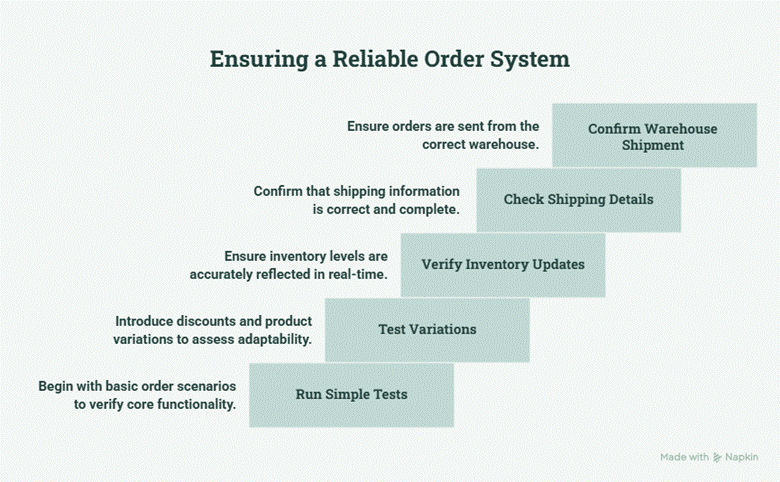
Do not go live and hope for the best. Run test orders to check the entire process.
Look for:
● quick inventory updates
● correct shipping details
● the right warehouse shipment
Start with simple tests. Then go for orders with variations and discounts and see what happens.
Mistakes To Avoid
Don’t try to connect too many tools at once. That creates confusion, especially if your team is still learning.
Another issue is weak SKU management. If product codes are sloppy or inconsistent, the warehouse system will not know what to do with them.
A third mistake is skipping staff training. Even a good system can create problems if the people using it do not know the basic process.
What a Good Setup Gives You
A solid WooCommerce-to-warehouse connection gives you better order control, cleaner inventory data, and fewer manual tasks. It also makes your business easier to grow because your process is no longer held together with spreadsheets and guesswork.
You do not need a giant warehouse to benefit from better operations. Even a small store can run like a much bigger one when the right systems are connected.
The main goal is simple: get the right order to the right person at the right time. When that happens, everything else gets easier.
Final Thoughts
If your WooCommerce store is growing, your warehouse process should grow with it. Start with a simple setup, keep the workflow clear, and make sure your tools talk to each other.
That is the difference between a store that feels reactive and one that feels under control. And when orders start moving faster, your team will feel the difference too.
