How WordPress Publishers Can Add Original Audio Without Slowing Their Sites

Original audio can make a WordPress publication feel more distinctive, but it can also become another heavy asset competing for attention and bandwidth. A large file, an autoplaying player, or several third-party embeds may turn a thoughtful creative addition into a slower and more distracting reading experience.
The solution is to treat sound creation and web delivery as one workflow. An AI Music Agent can help a publisher develop a cue for an article, podcast, course, or campaign, while performance decisions determine how that cue reaches the visitor. Neither side can compensate for neglect on the other.
Give Every Audio File a Job
Adding music because a page feels empty is rarely a strong reason. Audio should support a specific action or moment: introduce a recurring podcast, demonstrate a sound-design technique, accompany an interactive story, or provide a short preview of a larger creative project. If the page communicates just as well without the file, the extra request and interface may not earn their place.
Start by defining where the sound appears and how long a visitor reasonably needs it. A five-second sonic identifier has different requirements from a full interview. A tutorial about composition may justify an inline example, while an ordinary news post probably benefits more from a fast, quiet page. Purpose sets a practical limit before production expands.
Create for the Page Before Exporting
Web audio should be briefed in the context of the page. Tell the music system whether the cue sits beneath narration, opens after a deliberate click, or illustrates a point in the article. Specify the intended duration and a clean ending. Generating a long song and trimming it blindly later can leave the excerpt without a satisfying arc.
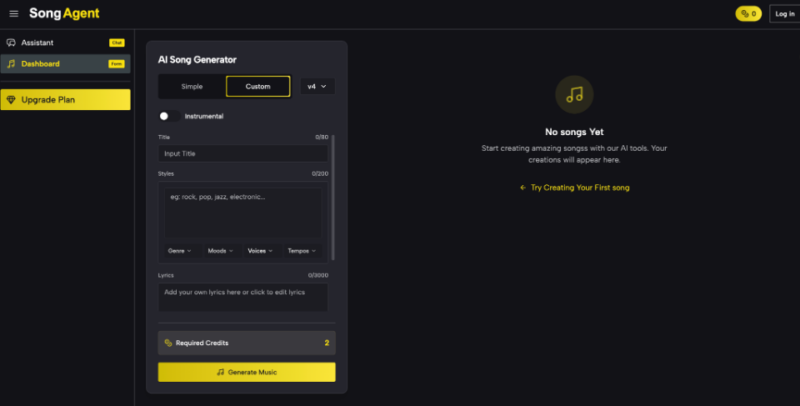
SongAgent uses a conversational process in which a user describes the musical vision, reviews a blueprint, generates the track, and requests refinements. That planning stage is useful for publishers because structure, instrumentation, tempo, and style can be checked against the content before a full file enters the editorial workflow. The goal is not maximum musical complexity; it is an arrangement that remains legible in its intended slot. If the cue will sit under speech, ask for space rather than simply asking for “background music.” If it supports a product tour, identify the moment that needs a lift. If several posts belong to one series, define a small set of stable traits, such as a recurring texture and restrained tempo range, so the files feel related without being identical.
Use a Performance-Safe Publishing Workflow
The best time to control audio weight is before the player is embedded. A repeatable process keeps creative revisions from bypassing technical checks.
- Export Only What the Page Needs
Keep a high-quality master in the project archive, then prepare a delivery version for the site. SongAgent lists MP3 and WAV downloads, along with vocal separation and stem options on its plans. A WAV master can be useful for editing, but a visitor usually does not need that larger production file for ordinary playback. Choose a web-ready format and trim unused silence from the beginning and end.
- Choose the Delivery Method Deliberately
Self-hosting gives the publisher control, but the audio still consumes server and visitor bandwidth. A specialized media host or content delivery network may handle larger audiences more efficiently, though third-party players can add scripts and network connections. Compare the complete page impact, not just the size of the audio file. Avoid stacking multiple players when a single playlist or linked listening page can serve the same purpose.
- Load Audio After User Intent
Autoplay is both intrusive and expensive. Present a clear play control and let the visitor decide. When the site setup allows it, avoid loading the full media resource until someone interacts with the player. A visible duration and a short description help users understand what they are about to hear, which makes the control useful rather than decorative.
- Test the Real Article Template
Do not judge performance on an empty test page. Publish the audio in a staging version of the actual template with its images, ads, analytics, fonts, and related-post modules. Test on mobile and a slower connection, then compare the page before and after the audio component. Watch for layout movement around the player, delayed interaction, and extra third-party requests as well as total transfer size.
Connect Sound to the Editorial Lifecycle
Audio requires maintenance just like images and embedded video. Store the master, web version, prompt or brief, license record, and related article information together. Use filenames that describe the series and version rather than “final-final-2.” If the page is updated, editors should be able to tell whether the cue still matches the content and whether a lighter export has replaced it. The same discipline helps with reuse. A publisher might adapt one sonic identity into a podcast opener, a short course transition, and a product-demo cue. With a conversational AI Song Agent, revisions can focus on duration or energy while the core direction remains recognizable. Each derivative should still be exported and tested for its own page instead of serving one oversized file everywhere.
Accessibility belongs in this lifecycle as well. Never make background music necessary for understanding a written article. Provide transcripts for spoken audio and concise text labels for musical examples. Ensure the player can be reached and operated without a mouse, and avoid unexpected sound. These choices improve the experience for people using assistive technology and for anyone reading in a quiet or public setting. Finally, verify that the selected generation plan permits the intended use. Licensing can differ between free and paid access, especially for commercial projects. Record the applicable terms when the file is created rather than trying to reconstruct them after a campaign or client handoff.
Creative Audio Should Earn Its Load
A useful WordPress audio strategy begins with purpose, creates to the dimensions of the page, exports a suitable delivery file, waits for user intent, and measures the complete template. That sequence protects both the creative idea and the visitor’s time.
Original music can strengthen a publication when it supports a real editorial moment. The standard is not whether the sound is impressive on its own, but whether the page remains fast, understandable, and easy to use with it. When audio earns its load, performance and identity no longer have to pull in opposite directions.
