Cloud Uploads Fail The Video to MP3 Converter Privacy Test

WordPress newsrooms write privacy pages that promise readers their media will not wander. Then a producer still drops the same interview into a hosted video to mp3 converter because the MP3 field in the CMS is empty. The policy and the habit are not the same document.
The test is boring on purpose. Take one file that already lives on the newsroom laptop. Ask whether a second machine must receive it before audio can exist. If the answer is yes, the privacy page is decoration. If the answer is no, the extract can stay inside the same browser session that already unlocked the folder.
That test is the one I now run before anyone adds another “trusted encoder” to the stack. The claim on the extract page is specific: FFmpeg runs in the browser, and the video is not uploaded for conversion. Either that claim holds for the file you actually care about, or you keep the cloud host and rewrite the privacy sentence.
Privacy Copy Dies At The Upload Button
Most media sites already have a paragraph about not selling reader data. They rarely have a paragraph about where interview files go when someone needs a cutdown. The upload button is where that silence becomes a second copy. Support tickets and “we delete after 24 hours” do not change the fact that the file left the building. A reader who asks where the raw interview lives should get a folder name, not a vendor name.
WordPress stacks make the lie easier because the CMS already trains people to upload. Featured images go up. Podcast enclosures go up. It feels consistent to send the source video to “one more box” so an MP3 can come back down. Consistency is the trap. The featured image was destined for the public file system. The source interview was not. Treat those as two different verbs or the privacy page becomes a caption under a media library nobody reads.
In our desk policy the first export that still requires a remote inbox is a fail, even if the MP3 sounds clean. Legal locked a week of podcast extras last spring for a thinner reason: a contractor had used a personal converter account. The audio was publishable. The chain of custody was not. Rework ate the next morning while we asked which host still had the wav.
Score Local Extract Against A Hosted Inbox
Put the two paths on one grid and refuse poetry. The newsroom does not need a better slogan. It needs to know which path creates a second landlord.

| Question | Hosted converter | Browser extract |
| Does the file leave the laptop? | Yes, before audio exists | No, FFmpeg stays in the tab |
| Can you retract the copy? | A ticket, if the host answers | Close the tab |
| What the privacy page can honestly say | We sent it, then asked them to delete | The interview never left this machine |
| What breaks first | A contractor forwards the host link | A weak laptop runs out of memory |
The last row is the honest trade. Local extract moves risk from a stranger’s disk onto your own RAM. That is a policy win for interviews and a hardware problem for a four-hour 4K dump on a cheap Chromebook. Write both sentences into the wiki. Do not pretend the cloud path is “the same privacy with more CPU.”
FFmpeg In The Tab Is The Actual Claim
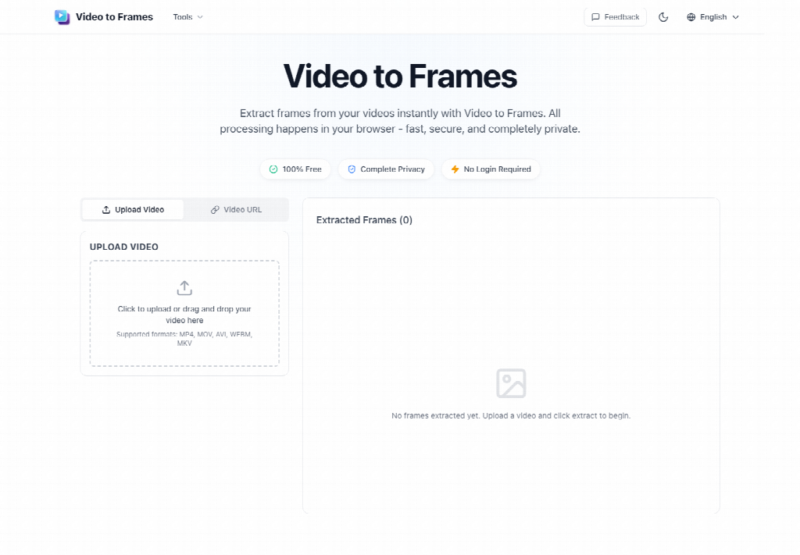
Video to Frames states the mechanism without a login wall: conversion runs in the browser with FFmpeg WASM, and files are not uploaded to a server. That sentence is the only product fact this comparison needs. If your file cannot be read by the browser, the claim does not apply and you are back to a download-then-upload story. If the browser can read it, you do not need a second inbox to mint an MP3.
I do not need a lab report to use that sentence. I need to watch whether the tab is working on a local file or waiting on a remote spinner. A remote spinner means the privacy page is already lying.
How The Site Path Stays Inside One Tab
The official path is short enough to put in a newsroom wiki without becoming a tutorial cult. Add the local file with Upload Video or Choose video. If someone insists on Video URL, it has to be a direct link the browser can fetch. Many CMS and player pages will fail that fetch. Then pick an audio format, set the range if you only need a line, and convert. Download stays on the same machine. If a producer cannot do those clicks on the edit bay, they should not be the person minting embargo audio.
Write the path as a permission, not as a suggestion. Off-VPN stringers can extract a single already-approved file on their own laptop. They cannot invent a new host because the laptop is slow. Slow is a hardware ticket. A new host is a legal ticket. Those tickets should not share a Slack channel. When they do, the faster message always wins, and the faster message is the upload.
A video to mp3 converter that refuses the server hop is the path that matches a “we do not upload source media” sentence. The wiki should say that in those words. It should not say “we use a trusted partner” unless legal has actually named the partner and the retention window.
Direct URLs Fail For The Same Reason Hosts Exist
CORS, login walls, and hotlink protection exist because media companies do not want random browsers pulling masters. That is also why the Video URL box is the wrong default for a newsroom file. If the asset is already on disk, use disk. If the URL fails, the failure is a reminder that the master was never meant to be fetched by a stranger’s tab. Download it through the official archive, then extract locally. Do not “solve” the fail by switching to a host that will accept the upload.
What The Wiki Should Ban By Default
Ban personal converter accounts. Ban “just this once” uploads of embargo folders. Ban sending the host link in Slack as proof the MP3 exists. The proof is a file in the recap folder with a slug and a date, sitting next to the original video. If someone cannot show both, the audio does not go into the CMS.
A pretty player preview still fails without custody. The real pass is: no second inbox, no unreadable hold date, no contractor copy. When I put last quarter’s embargo folder against the CMS draft, the only clean audio was the local extract. The hosted MP3 was the one that still carried a publicist’s sidebar. That file was discarded. It never cleared editorial.
Write The Hardware Limit Next To The Ban
Local extract can still fail on a dying laptop. The page does not enforce a hard upload cap, but a long 4K interview can exhaust memory. Desktop browsers usually survive longer files than phones. Treat that as a reason to extract on the edit bay, not as a license to return to a host from a reporter’s mobile Chrome in a taxi. Put the machine requirement in the same paragraph as the ban so people stop treating privacy as a slogan that ignores RAM.
Where A Hosted Encoder Still Wins
Batch pipelines, house transcoders, and any workflow that already keeps media inside your own object store are a different story. Those boxes are yours. A random website is not. If you already pay for an internal encoder, you do not need this page for daily volume. You may still want it for a producer who is off-VPN with one file and a CMS deadline. That is a narrow exception. Write it as an exception, not as the new default.
House encoders also have logs, access lists, and a person who can answer “who pulled this file.” A random website has a marketing page. If your newsroom cannot name the person who can kill a copy, you do not have a pipeline. You have a hope. Hope is what filled the contractor account last spring. The next hope will look like a free tab with a friendlier button. Put the internal encoder’s ticket link in the wiki so the free tab is not the only thing that loads from a hotel room.
There is one more fork people blur: publishing audio is not the same as extracting audio. The enclosure that hits the feed can live on your CDN. The source that created it should not have taken a vacation on a stranger’s disk on the way. Video to Frames only answers the extract fork. After download, your usual CMS hygiene still applies. Filenames, rights lines, and who may attach the file to a post are still your rules. The tab does not take those jobs, and it should not be blamed when someone pastes a raw extract into a public comment.
Limits That Stay After The Policy Lands
Video to Frames will not replace your archive, your CMS, or your rights spreadsheet. Very large files still depend on the machine in front of you. Remote URLs will keep failing when the host wants them to fail. Those are the edges. They do not excuse a second inbox for a file that already sits on the laptop.
Use The Local Tab Skip The Random Host
Use the local tab when the file is already on a newsroom machine and the privacy page still claims source media does not travel. Skip a random host when the only reason to open it is habit. Video to Frames is the extract button for the first case. It is not a new media company, and it should not be written up as one.
If the wiki cannot say “the interview never left this machine,” do not publish the privacy sentence. Change the habit or change the copy. The MP3 can wait that long.