Squarespace vs WordPress: Real 3-Year Cost and What You Own

Squarespace Core costs $1,044 over 3 years on annual billing. A self-hosted WordPress site on an entry hosting plan can cost $120 over the same 3 years. The gap is real. The cheaper side asks for your time, though, and leaving Squarespace later leaves part of your site behind.
On 29 October 2026 we read Squarespace’s US pricing page and its help articles on exporting and redirects. We also read the pricing pages of a WordPress host and a forms plugin. Then we added up 3 years on each side. We build WordPress sites for small business owners, so read our view with that in mind. We also say plainly when staying on Squarespace is the better call.
In brief
- Squarespace plans cost from $19 to $99 a month on annual billing, or from $25 to $139 billed monthly. Prices are from squarespace.com on 29 October 2026.
- By our sums, 3 years on Squarespace costs from $684 (Basic) to $3,564 (Advanced). WordPress on entry hosting costs from $120 to about $370, plus your time for updates.
- The Squarespace export carries layout pages, one blog, text, images and galleries into WordPress. Store pages, styles, custom CSS, video blocks and drafts stay behind.
- Moving pays off on price within a few years for sites on Plus or Advanced. For a small site on Basic or Core, the saving takes years to cover a rebuild.
Squarespace vs WordPress: a rented builder or software you host
Think of Squarespace as a website builder you rent. One subscription includes the hosting, the templates, the security certificate and the updates. Squarespace creates a free SSL certificate for every site, including sites on a custom domain. On Core and above, the plan also includes one Google Workspace email account free for the first year.
WordPress is software you install on hosting you choose. WordPress itself is free. You pay a host, you pick a theme and plugins, and someone has to keep it all updated. That someone is you, or a person you pay.
So the choice comes down to who does what. On Squarespace, hosting, the certificate, updates and backups come with the plan, and you get the features your plan includes. On WordPress, hosting and the certificate come from your host, updates are yours, and features come from plugins, free or paid. Wix sits on the same side as Squarespace here: it is also a builder you rent.
The trade-off shows up in design work too. A Squarespace template is quick to edit and hard to break, and that ease of use is a large part of what you pay for. A WordPress theme allows deeper customisation, down to the code, which also leaves more room to break things.
One more distinction matters later. WordPress.com is a hosted version of WordPress run as a service. Self-hosted WordPress runs on any host. When you move a site, the two import images differently.
Squarespace pricing in 2026, from its own pricing page
Prices depend on your billing country. These are the US prices on Squarespace’s pricing page, read on 29 October 2026. Each plan is free for 14 days, and paying annually saves up to 36%.
| Plan | Billed monthly | Billed annually | Online store fee | Courses and memberships fee |
|---|---|---|---|---|
| Basic | $25/mo | $19/mo | 2% | 7% |
| Core | $39/mo | $29/mo | 0% | 5% |
| Plus | $65/mo | $49/mo | 0% | 1% |
| Advanced | $139/mo | $99/mo | 0% | 0% |
Card payments through Squarespace Payments cost 2.9% + $0.30 on Basic and Core. Plus pays 2.7% + $0.30 and Advanced 2.5% + $0.30. The 2% store fee on Basic comes on top. On $10,000 of online sales a year, that fee alone is $200.
Annual plans include one year of free domain registration. After that, the domain renews at Squarespace’s standard rate, so budget for it from year 2.
These prices are recent. Fuzen reported in August 2026 that Squarespace raised its plans in July. Basic went from $16 to $19, Core from $23 to $29 and Plus from $39 to $49, while Advanced stayed at $99. Older comparisons still quote the old numbers.
Readers in Australia see the same page in Australian dollars. On 29 October 2026 it showed A$17, A$28, A$49 and A$109 a month on annual billing.
What a WordPress website costs once hosting, plugins and time are counted
Entry hosting looks cheap at the signup price. The renewal price, any paid plugin and the monthly upkeep set the real WordPress bill.
- Hosting. Hostinger’s WordPress Premium plan showed $2.49 a month on 29 October 2026. You pay $119.52 upfront for 48 months. After that term it renews at $10.99 a month, which is $131.88 a year. The plan includes a free domain for one year and weekly backups.
- A paid plugin, if you need one. Many sites run on free plugins only. If you want a form builder with more features, WPForms Basic was listed at $49.50 for the first year, normally $99.00.
- Your time. Someone has to update WordPress, the theme and the plugins, check that backups run, and fix the odd conflict after an update. Squarespace does this for you. On WordPress, you either do it or pay for it.
Our own hosting bill, for comparison, is A$100 for 3 years, plus A$20 a year for the domain. Entry hosting really is that cheap. The catch is the renewal price after the intro term ends.
The 3-year bill side by side
Here is what the published prices add up to over 36 months. We leave the domain out of both columns. Both sides give the first year free, and after that you pay a registrar either way.
| Setup | 3-year total |
|---|---|
| WordPress on Hostinger Premium, free plugins | $119.52 |
| WordPress on Hostinger Premium, plus WPForms Basic | $367.02 |
| Squarespace Basic, annual | $684 |
| Squarespace Core, annual | $1,044 |
| Squarespace Core, billed monthly | $1,404 |
| Squarespace Plus, annual | $1,764 |
| Squarespace Advanced, annual | $3,564 |
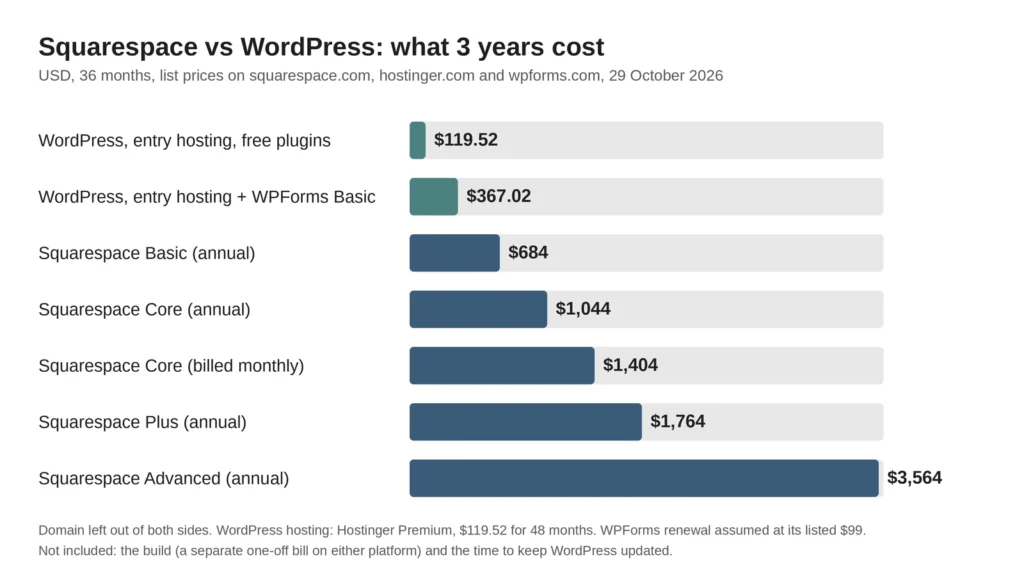
How we got there. Each Squarespace total is the monthly price times 36. The WordPress hosting total is the 48-month upfront price, which covers all 3 years. The WPForms line assumes the plugin renews at its listed normal price of $99 after the first year.
Two things this table does not show. First, the build is a separate bill on both platforms. A Squarespace designer charges for the build just as a WordPress studio does. If you build a website yourself, you pay in hours on either platform. Second, the WordPress column assumes someone does the upkeep for free. If you pay a person to do it, add their fee before you compare.
What you actually own: what the Squarespace export carries into WordPress
There is one export format, an .xml file made for WordPress. Squarespace’s help article, last updated on 9 October 2026, lists what goes into that file and what does not.
What the export carries across:
- Layout pages
- One blog page, with all its posts and up to 1,000 comments per post
- Text blocks and image blocks
- Gallery pages
- Text from other blocks, such as embed blocks, with minimum structure
What stays behind:
- Other page types: album, cover, index, info, calendar, portfolio and store pages
- Headers, footers and sidebars set for a single page
- Any second or third blog page, because only one blog exports
- Dropdowns, audio blocks, product blocks and video blocks
- Drafts
- Style settings and custom CSS

Forms are not on the list of content that exports. Plan to rebuild each form in WordPress, with a form plugin, and test where the messages go.
If you sell products on Squarespace, your store leaves another way. Squarespace exports products to a .csv file, up to 10,000 products, and WooCommerce can import that file. The .csv leaves out additional product information, customer reviews, featured images, product image alt text and variant images. Expect to add those by hand.
Images need care. If you import into self-hosted WordPress with the WordPress Importer plugin, Squarespace warns that your images might not migrate. WordPress may keep links to images still stored on Squarespace, and those links break once you cancel. Importing into WordPress.com copies the images across instead. On self-hosted WordPress, download your images and upload them to the media library yourself.
One limit to know before you start: you cannot export from a trial site. The site has to be published and public.
Moving from Squarespace to WordPress without losing your SEO rankings
Search engines know your pages by their addresses. A move protects the positions you already have if every old address leads somewhere sensible on the new site. It does not add rankings, and nothing about a move guarantees them.
- List every URL you have now. Pull them from your site’s page list and from the pages report in Google Search Console. Include blog posts, products and any page that gets visits.
- Keep blog addresses the same. Squarespace blog posts sit at /blog/post-title. In WordPress, set permalinks to a custom structure of /blog/%postname% and the post addresses stay identical.
- Set a 301 redirect for every address that changes. A 301 tells search engines a page has moved for good. Its standing then passes to the new address. Put these redirects on the WordPress side, with a redirect plugin or at the server.
- Copy page titles and meta descriptions across. Squarespace keeps these in its built-in SEO tools, and the export list does not mention them. Check each page and set them again in an SEO plugin such as Yoast SEO.
- Keep the Squarespace site live and public until the import is done. WordPress.com’s own guide asks for this, so images can still be fetched.
- Point the domain, then check. Click through your old URL list and confirm each one lands on the right page. Submit the new sitemap in Search Console.
Why the redirects belong on WordPress: Squarespace’s URL mappings only redirect from domains connected to your Squarespace site. Once your domain points to the new host, those mappings no longer run. The same help article says image and file URLs cannot be redirected at all, because they sit on Squarespace’s content delivery network. So old image addresses will not pass their search traffic on. Image traffic has to be earned again by the new files.
A short redirect map looks like this:
- /services/web-design → /web-design/ (301)
- /shop/blue-mug → /product/blue-mug/ (301)
- /about-us → /about/ (301)
For scale, Squarespace’s own redirect field holds about 2,500 lines. Use that as a check: if your list runs into the hundreds, use a plugin that imports redirects from a spreadsheet.
When moving pays off for a small business, and when staying on Squarespace is the better call
Price alone rarely justifies a move on a small plan. Here is the plain sum, using the totals above. WordPress with a paid forms plugin costs about $122 a year over 3 years.
- On Core, $29 per month or $348 a year, you save about $226 a year. A rebuild costing $1,500 takes more than 6 years to pay back on price alone.
- On Plus, $588 a year, you save about $466 a year. The same rebuild pays back in a little over 3 years.
- On Advanced, $1,188 a year, you save about $1,066 a year. It pays back in under 18 months.
These are sums for a simple site. A store on Plus or Advanced has its own costs on WordPress, such as payment fees and paid extensions. Price those before you decide.
Moving tends to pay off when:
- Your plan bill is Plus or Advanced and the site is mostly pages and posts, which export cleanly.
- You need a feature that only exists as a plugin, or an integration your plan does not offer.
- You run more than one blog. Only one blog exports, and the longer you wait, the more you will copy by hand later.
- You want the site, the hosting and the domain in your own name, portable to any host.
Staying on Squarespace is the better call when:
- The site is a small brochure or portfolio on Basic or Core, and it does what you need.
- Most of your content sits in portfolio, index or store pages. None of these export, so the move becomes a full rebuild.
- Nobody will look after WordPress updates. A site that misses its updates becomes a security risk, and the saving stops being worth it.
If your site needs a rebuild rather than a copy, that is the part worth paying for once and getting right. It is the work behind our WordPress website design packages, where the domain and hosting stay in your name. Whoever builds it, ask for the redirect map before launch.
Frequently asked questions
Is Squarespace or WordPress cheaper?
WordPress usually costs less in cash, as long as the WordPress hosting stays on an entry plan. By our sums, 3 years on entry hosting costs from $120 to about $370, against $684 to $3,564 on Squarespace annual plans. WordPress costs more in time, because you or someone you pay keeps it updated.
Is Squarespace better than WordPress?
For a small site with no one to maintain it, Squarespace is often the better platform. WordPress is the better fit when you need plugins, several blogs or full control of where the site lives. The deciding question is who will do the upkeep.
Can I move my Squarespace site to WordPress?
Yes, partly. The .xml export carries layout pages, one blog, text, images and galleries. Store pages, other page types, styles, custom CSS and video blocks do not export. Products move separately as a .csv file.
Will I lose my Google rankings if I move from Squarespace to WordPress?
A move protects the rankings you have when every old URL either stays the same or has a 301 redirect to its new address. No move guarantees rankings. Set the redirects on the WordPress side, because Squarespace’s own URL mappings stop working once the domain moves. Old image URLs cannot be redirected, so image traffic has to be earned again.
Does Squarespace charge transaction fees?
On Basic, yes: 2% on online store sales, on top of card fees. Core, Plus and Advanced charge 0% on store sales. Fees on courses and memberships run from 7% on Basic down to 0% on Advanced.
Vasilii Aldukhov founded Web Ways Tech in Sydney and has built websites for ten years, mostly in WordPress. He works with Australian businesses on rebuilds, ecommerce and the search foundations underneath them.