
Top 9 Best IT Asset Management Software for Remote Teams (2027 Review)

Remote work is business-as-usual, yet many companies still manage laptops as if they never leave HQ. In reality, devices sit on spare-bedroom desks, co-working tables, and café counters in dozens of countries. That distance turns basic tracking into a high-stakes guessing game.
According to Capterra’s 2022 Employee Offboarding Survey, more than seven in ten departing employees don’t return gear on time, stranding thousands of dollars of hardware—and the data on it—in limbo. Spreadsheets and goodwill no longer suffice.
We evaluated dozens of ITAM platforms against nine factors—remote readiness, real-time visibility, global logistics, integration depth, and pricing clarity—to build the ranked shortlist below.
How we scored the market
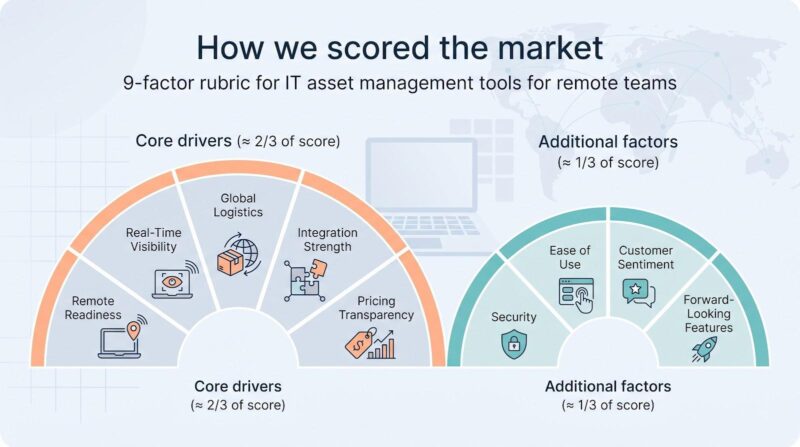
Great tools can boast, but numbers keep them honest. We built a nine-point rubric and ran every contender through it. Each factor answers a question remote IT leaders face daily.
First, Remote Readiness checks whether a platform can enroll, track, and offboard devices wherever employees sign in, with no VPN or office-only steps.
Next, Real-Time Visibility asks whether the system still sees a laptop on home Wi-Fi. We give full credit only to products whose agents or cloud APIs phone home reliably.
Third, Global Logistics measures how well a vendor helps you ship, store, and reclaim hardware across borders. Most software stops at the loading dock; a select few, including our top pick, keep going.
Allwhere, for example, reports a 91 percent on-time laptop retrieval success rate—triple the 29 percent prepaid-label average we see elsewhere—thanks to courier-API tracking that surfaces every mile in the dashboard.
The same portal auto-creates the correct customs forms and lets departing employees schedule prepaid pickup slots, turning a messy hand-off into a predictable workflow that easily earns full marks on our Global Logistics scale.
We then weigh Integration Strength. Your asset data must sync with HR, MDM, and identity providers, or you will chase spreadsheets forever.
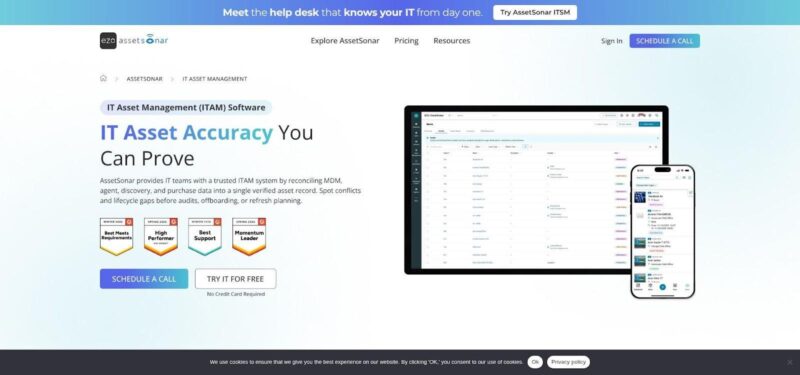
Finally, we score Pricing Transparency. If a prospect cannot see ballpark costs on a website, we mark it down. AssetSonar, for instance, posts a clear $0.75 per asset per month entry price (no form fill required).
Those five drivers account for almost two-thirds of the total score. Security, ease of use, customer sentiment, and forward-looking features round out the remaining points.
The result is a data-led ranking you can trust, not a pay-to-play roster. Now let’s meet the winners, starting with the one tool that fixes the 71 percent no-return problem head-on.
1. Allwhere: best for end-to-end asset lifecycle management
Picture a platform that doesn’t stop at “assigned.” It buys the laptop, images it, ships it to Bogotá, tracks every hand-off, then picks it up in Lisbon two years later and sends you a certified wipe report. That cradle-to-grave workflow puts Allwhere at the top of our list.

Most ITAM tools treat shipping and retrieval as someone else’s problem. Allwhere bakes those miles into the process. Click Onboard and a pre-imaged kit lands on the new hire’s doorstep, with customs paperwork, duties, and final courier already handled. Click Offboard and a prepaid pickup appears on the calendar, pushing return rates far above the 29 percent prepaid-label average we see across the industry. Their survey-backed guide, ITAM best practices from allwhere, shows that 64 percent of companies have lost at least one device in transit, so building logistics into the workflow is not optional.
The software keeps pace. A real-time dashboard shows every device status—In Transit, With Employee, In Storage—so finance finally knows where assets sit and for how long. Chain-of-custody logs satisfy auditors without extra spreadsheets. Hooks into HRIS and identity platforms trigger shipping or retrieval the moment someone joins or leaves, closing the gap that loses 71 percent of gear today.
Allwhere prices on a quote basis, and yes, you pay for white-glove service. Compare that to writing off a two-thousand-dollar MacBook plus the hours your team spends chasing ex-employees; the math shifts quickly. If global logistics keeps you awake, this is the only vendor on the list that lets you sleep.
2. AssetSonar: best all-in-one suite for distributed IT
AssetSonar feels like the Swiss Army knife of ITAM: one console covers hardware, SaaS licenses, help-desk tickets, and HR hand-offs. That breadth matters when your workforce hops between kitchen tables and offices without warning.
The platform’s secret weapon is its agent-plus-integration model. Lightweight agents check in from any network, and connectors pull data from Intune, Jamf, and Azure AD. The result is spotless visibility, even if a laptop hasn’t touched your VPN in months, as detailed in an AssetSonar analysis of ITAM for hybrid remote teams.
Once the data arrives, AssetSonar maps it to the person behind each device. HR adds a new hire, and their gear auto-assigns. An exit date hits the HRIS; offboarding tasks fire, and IT sees exactly which assets remain with the employee.
Cost control is equally clear. Pricing starts at $0.75 per asset per month, posted in plain sight; no sales call required. Field proof matters, too: a document-solutions firm with staff in 22 remote locations gained smooth offboarding workflows and precise hardware forecasts after rolling out AssetSonar’s agent-based tracking.
Limitations? The tool will not ship boxes or book couriers; that remains Allwhere’s area. Advanced software metering also costs extra. For teams of a few hundred to a few thousand people that want one pane for inventory, service desk, and license data without enterprise sprawl, AssetSonar tops the list.
3. InvGate Assets: best for fast roll-out and built-in remote support
InvGate feels light after enterprise giants. Spin up the cloud instance, push its agent, and you have a live asset inventory before lunch. Every device reports in, even if it never touches the company VPN again.
The standout feature is one-click remote access. From any asset record you can launch TeamViewer, Splashtop, or native RDP and jump straight onto a troubled laptop. No context switching, no copy-pasting IDs. For lean IT teams juggling Slack pings from six time zones, that shortcut is gold.
Automation adds muscle. Connect InvGate to your HR or directory service and new-hire kits assign automatically, while exit dates trigger offboarding tasks that flag unreturned gear. The no-code workflow builder keeps those hand-offs painless, with no developer required.
Cost lands in the middle of our list. InvGate charges by asset tier rather than technician seats, and published examples show entry pricing in the low hundreds of dollars per month for a few thousand devices. That predictable math helps when your headcount is climbing.
Limitations? The tool does not handle physical shipping, and its software license analytics stop short of heavyweight SAM engines. If you want quick deployment, remote control built in, and a UI your team can master in a week, InvGate is the practical, just-enough choice.
4. NinjaOne: best for live endpoint monitoring and asset health
NinjaOne began life as an RMM, so it treats every laptop like a server that never clocks out. Agents stream real-time metrics (CPU spikes, disk errors, missing patches) into a single dashboard. You don’t just know who holds a device; you know whether it is quietly failing.
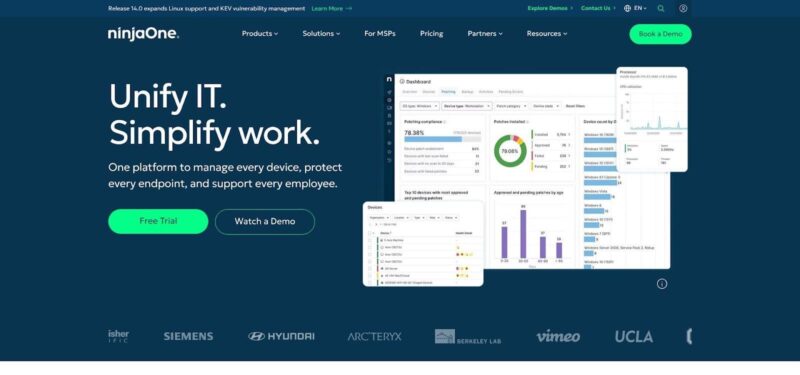
That live feed comes with a strong reputation. More than 4,400 IT pros rate NinjaOne 4.7 out of 5 on G2, praising its reliability and speed. Those votes of confidence matter when you plan to roll a tool across hundreds of remote endpoints.
Operational power shows up everywhere. Need to push a zero-day patch? Select the affected devices and schedule overnight updates. User pings you on Slack? Click once to remote in and fix the issue without asking for an IP address. Every step, from monitoring to remediation, writes back to the asset record so history stays intact.
NinjaOne charges per endpoint; prices sit behind sales calls, but customers report bundles that replace separate RMM, patching, and inventory tools. The math improves fast when you retire three invoices at once.
Limitations? The platform offers only lightweight software license insights and cannot schedule couriers to pick up retired gear. Pair it with a logistics partner if retrieval pain keeps you up at night. For visibility, uptime, and rapid response, though, NinjaOne stands out.
5. Freshservice: best ITSM-plus-asset hub for remote teams
Freshservice wins fans by pairing a friendly help desk with a capable asset database. Tickets, approvals, and hardware details all live under one roof, so information never slips between separate tools.
Remote hires feel the impact on day one. An HR trigger spins up an onboarding workflow that orders a laptop, assigns software, and primes a welcome ticket, with no manual hand-off between departments. When that employee moves on, the same workflow flags every device still in their possession and reminds IT to begin retrieval.
Discovery is equally hands-off. Install the lightweight agent or connect Intune and Jamf, and Freshservice pulls device specs and software lists directly into its CMDB. Assets update whether the user is on office Wi-Fi or home fiber, giving you a living inventory instead of a quarterly snapshot.
Pricing is tiered by feature set. Plans start around twenty dollars per support agent each month, though asset management unlocks at the Growth tier for $49 per agent, which includes 100 managed assets. You will need extra asset packs to cover a large fleet. The model favors lean IT teams that want strong ITSM features alongside asset data, rather than those seeking a low-cost inventory tool.
Two cautions before you click “buy.” First, Freshservice will not book couriers for returns, so you still need a logistics partner. Second, custom workflows sit behind higher tiers, so budget accordingly if you need deep automation.
For organizations that want service tickets and asset data in one place without the weight of enterprise giants, Freshservice offers a clean, cloud-first solution.
6. ServiceNow ITAM: best for enterprise-scale governance
ServiceNow is the heavyweight champion of process control. If your leadership wants every asset change logged, approved, and audited across five continents, this platform makes it happen.
The power sits in its workflow engine. HR finalizes a resignation in Workday, and ServiceNow automatically spins up tasks to revoke accounts, schedule a courier, and freeze the user’s SaaS licenses until hardware is confirmed returned. Each step waits on the previous one, so nothing slips through.
Data sources converge here, too. ServiceNow pulls feeds from its own network discovery, Intune, Jamf, AWS, and dozens of other tools, then normalizes them in a single CMDB. That clean record keeps finance, security, and compliance teams on the same page.
The catch is cost. Industry analysts note that ServiceNow’s quote-only model drives a considerably higher total cost of ownership than SMB-oriented tools. Add consulting hours for rollout and ongoing admin, and most enterprises face a six-figure commitment.
Usability also demands maturity. Out of the box, ServiceNow gives you a blank canvas. Painting the masterpiece (roles, forms, and dashboards) takes dedicated admins. Once tuned, the result is a calibrated governance machine that scales to hundreds of thousands of assets without breaking a sweat.
Choose ServiceNow when global policy enforcement, audit trails, and deep integration outweigh sticker shock. It is overkill for a 300-person startup, but for a multinational bank or healthcare network, few platforms match this depth of control.
7. ManageEngine AssetExplorer: best value for budget-conscious teams
AssetExplorer shows you can run disciplined ITAM without a giant wallet. For roughly a thousand dollars a year you can track 250 assets, complete with purchase orders, warranties, and disposal records. That pencils out to coffee-money pricing, about four dollars per device per year, yet still covers the full hardware lifecycle.
The platform is old-school in the best way: install it on a small Windows server or spin up the hosted version, deploy its agent, and watch the inventory populate. Need software counts for an audit? They’re a click away. Want purchase history tied to that laptop? It sits on the same screen. That completeness is rare in this price band.
Remote work stays visible through always-on agents that report over the internet. Pair AssetExplorer with ManageEngine’s Endpoint Central and you also gain patching and remote control, helpful add-ons if you prefer an all-in-suite world.
Trade-offs match the sticker price. The interface feels dated, and integrations outside the ManageEngine family are thin. Advanced SaaS license metering or AI-driven insights are missing. Shipping logistics remain your responsibility.
For small and mid-market companies that simply need to know what they own, who has it, and when warranties expire, AssetExplorer offers the most cost-effective path to real governance. Spend the savings on better laptops or extra coffee for the IT team.
8. Lansweeper: best for “find-everything” discovery
Before you can manage assets, you have to know they exist. Lansweeper excels at that first mile. Drop a scanner on each network segment and it sweeps up every IP device—servers, switches, smart TVs, even a rogue Raspberry Pi under the intern’s desk.
For remote-only laptops, install an optional agent or let them report through the new cloud relay. Either way, ghost devices surface fast. Run the built-in report “assets not seen in 30 days” and you have an instant follow-up list.
The product focuses on discovery, not lifecycle finance, and that clarity keeps it affordable. A free tier covers 100 assets; paid plans sit around two-and-a-half grand per year for 2,000 devices. That is modest for the visibility you gain.
Data never stays locked inside. Lansweeper pushes inventories into ServiceNow, Jira, or your own scripts through an open API. Many enterprises use it as the discovery engine feeding a richer ITAM or CMDB. For smaller shops, the built-in dashboards may be enough.
Expect trade-offs. You will still run your own offboarding workflows, and procurement lives elsewhere. But if “unknown unknowns” haunt your audits, Lansweeper is the radar that finally lights them up.
9. Oomnitza: best for cross-department workflow automation
Most ITAM platforms stay in their lane. Oomnitza drives into HR, finance, security, and procurement, then stitches every touchpoint into a single no-code workflow engine. The result feels less like an asset database and more like mission control for every team that touches hardware or software.
Picture a new hire in Berlin. HR enters the start date; Oomnitza triggers a laptop purchase order, reserves an Intune license, creates Okta credentials, and alerts finance to assign the asset to the right cost center—all before the employee’s first stand-up. The same choreography runs in reverse at offboarding, even pinging your courier service when the laptop is overseas.
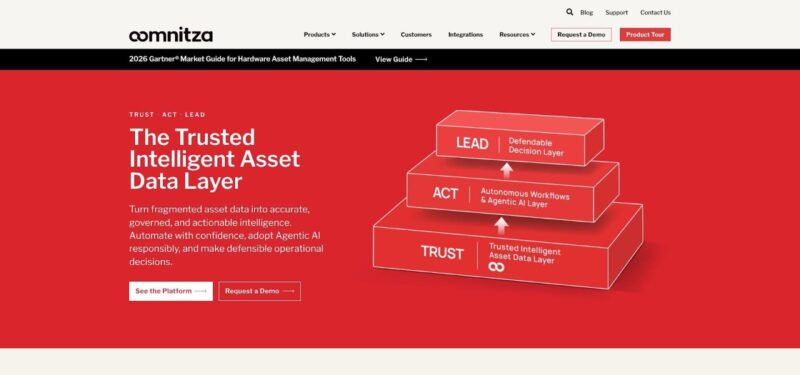
Data flows in from everywhere: Intune, Jamf, AWS, Jira, Zendesk, and dozens more. Oomnitza’s library of pre-built connectors means you spend hours configuring, not months coding. Dashboards then surface metrics execs value, such as refresh cycles, unused SaaS spend, and the carbon footprint of retired hardware.
The trade-off is complexity. Oomnitza rewards teams ready to map processes in detail; if all you need is a simple asset list, lighter tools will be quicker. Pricing is quote-based and tilts toward mid-enterprise budgets, though customers often justify the spend by retiring multiple siloed systems.
For organizations where assets move through many hands and departments, Oomnitza turns scattered tasks into one seamless flow, saving time, license dollars, and grey hairs across the company.
Choosing the right fit: a quick decision guide
Nine strong contenders, nine distinct personalities. The best choice depends on the pain you want gone first.
If hardware retrieval keeps you awake, start with Allwhere. It turns courier chaos into a button click and can pay for itself in saved laptops.
Need an all-in-one dashboard that blends tickets, licenses, and assets without enterprise bulk? AssetSonar or Freshservice offer that breadth at friendly price points.
Running a lean IT team and want speed? InvGate deploys in hours and ships with remote desktop built in. Pair it with a coffee and you can have live inventory by the afternoon.
For teams that rely on endpoint uptime, NinjaOne brings live health data and patching together; ideal when one admin watches hundreds of remote laptops.
Large, regulated enterprise? ServiceNow rules the governance game. Budgets may wince, but auditors smile.
Need solid tracking on a startup budget? ManageEngine AssetExplorer covers purchase to disposal for less than you spend on office snacks.
Worried about shadow IT across hybrid networks? Drop Lansweeper in and watch unknown devices light up your dashboard.
If your asset process spans HR, finance, and security, Oomnitza automates the entire relay so no baton hits the floor.
