
Your WooCommerce Store Is Leaving Money on the Table — Hippoo BI Fixes That

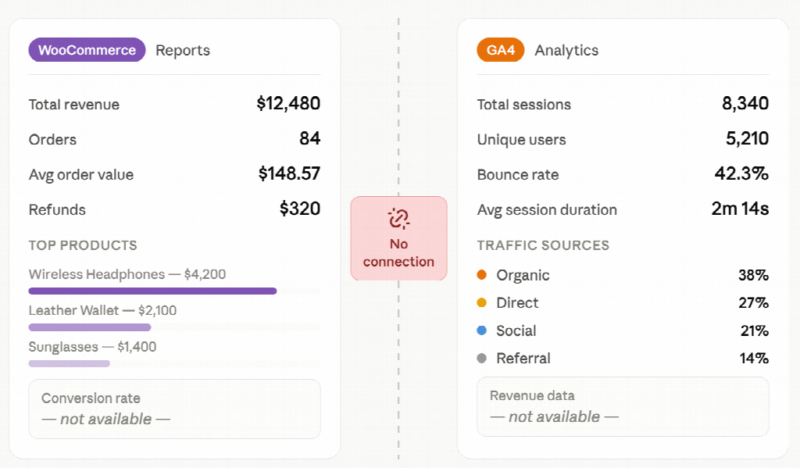
Every week, thousands of WooCommerce store owners check the same two places: their WooCommerce reports for revenue, and Google Analytics for traffic. They look at both screens, nod, and move on — without realizing the most valuable data in their business is sitting invisible in the gap between them. Hippoo WooCommerce app BI was built specifically to close that gap.
That gap is costing you sales. And Hippoo is the first tool built inside WooCommerce’s ecosystem that actually connects the dots.
Why Your WooCommerce Data Isn’t Telling You the Full Story
Open your WooCommerce reports right now. You’ll see revenue, order counts, maybe a top products list. It’s clean. It’s accurate. And it tells you almost nothing about why your store performs the way it does.
Now open the WooCommerce app. Orders coming in. A revenue number for today. A quick dopamine hit — but no insight.
The question WooCommerce reports have never been able to answer is the one that matters most:
If 800 people visited my product page this week and I only got 2 orders — what went wrong?
Without connecting traffic to sales, you’re optimizing blind. You’re guessing at prices, rewriting descriptions based on intuition, and running promotions without knowing which products actually deserve the attention.
There’s a Better Way to Read Your WooCommerce Data
Hippoo BI is a built-in analytics engine for WooCommerce stores — no plugins to install, no external services to configure, no data sent anywhere outside your site.
It pulls from the same WooCommerce data your reports already use, adds a native traffic tracking layer, and combines them into something that actually tells you what’s happening in your store.
Think of it as the WooCommerce report that should have shipped with WooCommerce from day one.
A Complete Picture of Your Store’s Performance
The Overview Dashboard Your WooCommerce App Can’t Match
The Hippoo BI overview gives you every number that matters — without switching between four different screens:
- Net revenue (after refunds, accurately calculated)
- Total orders and average order value
- Real conversion rate — actual orders divided by actual sessions
- Revenue per visit across your entire store
- New customer count vs. returning customers
- A single chart with both traffic volume and revenue plotted together
The WooCommerce app gives you a revenue number. Hippoo BI gives you the story behind it.

Per-Product Breakdown: The WooCommerce Report That Changes Everything
Here’s where Hippoo BI goes further than any WooCommerce report available today.
For each product in your store, Hippoo tracks the full journey — from first page visit to completed order — and surfaces where customers drop off. Then it automatically categorizes every product with a plain-language insight so you know exactly where to focus.
Products in your store right now likely fall into one of these categories:
| What Hippoo flags | What it means for your store |
| 🔴 High traffic, low conversion | Visitors are finding this product but not buying — pricing, images, or copy need work |
| 💎 Hidden gem | Strong conversion rate but low traffic — promote this product more aggressively |
| ⚠️ Cart abandonment issue | Add-to-cart rate is healthy but orders aren’t completing — checkout friction |
| ✅ Strong performer | This product is working — study it and apply the same approach elsewhere |
| ⛔ Zero-sales product | Getting visits but no purchases — consider removing or relisting |
No spreadsheet. No manual calculation. Hippoo reads your WooCommerce data and tells you what it means.
Customer Churn Reporting — What WooCommerce Never Built
WooCommerce reports track customers by what they’ve bought. They don’t track what customers stopped buying — and that silence is where revenue quietly disappears.
Hippoo BI adds a churn monitoring layer that analyzes every WooCommerce customer’s purchase history and flags who’s at risk of not coming back. Each customer gets a score, updated automatically overnight:
- 🟢 Active — purchasing regularly, no action needed
- 🟡 At risk — purchase gap is widening, worth a check-in or offer
- 🟠 High risk — last purchase was a while ago, needs direct outreach
- 🔴 Churned — inactive past the threshold, prime candidate for a win-back campaign
Export any segment to CSV and hand it to your email tool. The WooCommerce report for customer retention you’ve been wishing existed — it’s here.
Performance That Won’t Slow Your Store Down
Unlike some WooCommerce analytics solutions, Hippoo BI was built with server performance as a hard requirement — not an afterthought.
- Page tracking runs asynchronously via sendBeacon — visitors never wait for it
- Nightly cron jobs handle heavy calculations instead of running them on demand
- Intelligent caching means most API calls return in under 500ms
- No full IP addresses stored — only country-level location data
- Automatic data cleanup after 13 months keeps database tables lean
Your store stays fast. Your server stays healthy.
Side by Side: What Each Tool Actually Gives You
| What you need to know | WooCommerce reports | WooCommerce app | Hippoo BI |
| How much did I earn? | ✅ | ✅ | ✅ |
| How many people visited? | ❌ | ❌ | ✅ |
| Which products convert best? | ❌ | ❌ | ✅ |
| Where are visitors dropping off? | ❌ | ❌ | ✅ |
| Which customers might not return? | ❌ | ❌ | ✅ |
| Does it need extra plugins? | ✅ | ✅ | ✅ |
| Does it leave my server? | ✅ | ✅ | ✅ |
Stop Reading Reports. Start Understanding Your Store.
WooCommerce reports are good at recording history. The WooCommerce app is good at showing you today’s number. But neither one helps you understand why your store performs the way it does — or what to do differently tomorrow.
Hippoo BI connects the dots that WooCommerce reports leave disconnected. It watches your traffic, reads your WooCommerce data, and surfaces the insights you’d otherwise miss — automatically, inside the tool you’re already using.
Your store is generating more signal than you’re capturing. Hippoo BI makes sure none of it goes to waste.
Hippoo BI comes built into the Hippoo plugin. Compatible with any WooCommerce store running WooCommerce 7.0 and above.