9 Landing Page Optimization Fixes to Stop Visitors Bouncing

Landing page optimization is what you do when you are sick of paying for clicks that bounce in 3 seconds. You paid real money for that click. Then the page gets a few seconds to prove it was worth it. Fumble it, and they are gone. And a slow page loses a few before they have read a word.
So let’s talk about winning those seconds. First up is what landing page optimization even means and why it is worth the bother. Then 9 fixes that keep people from bouncing. We will end on the mistakes that waste the whole effort.
What Is Landing Page Optimization (LPO)?
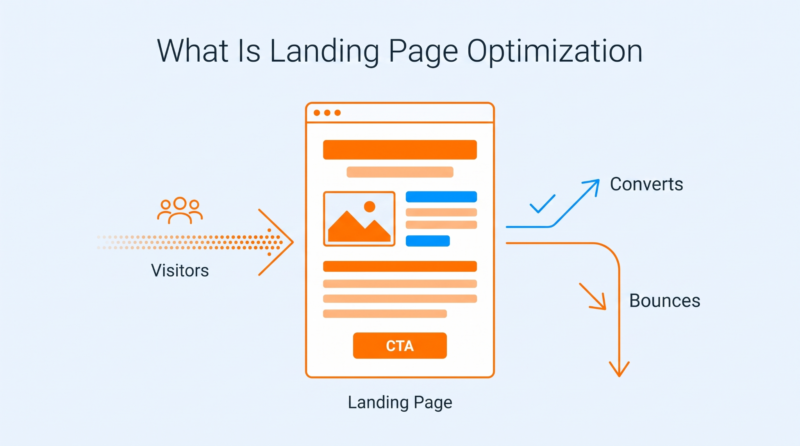
Quick definition, then the good stuff. Skip ahead if you already live this.
Landing page optimization means tuning one single page until more of the people who show up actually do what you are after. Maybe that is a purchase. Maybe a signup or a booked call. You are working the traffic you already have and squeezing more out of the exact same clicks.
A landing page isn’t your average web page either. It has one job and one type of visitor. Somebody clicked a specific ad expecting a specific thing. The page either gives them that fast or watches them leave.
People leave for dull, fixable reasons. The landing page message doesn’t match the ad. The next step is a mystery. There is a wall of text. Or the page is slow, and they are done before it finishes. And truth be told, that is happening on most landing pages. But every one of those is something you can fix.
And there is a lot of room to work with. The average eCommerce landing page converts at a measly 12.9%, going by Unbounce’s numbers. So nearly 9 in 10 people are still walking. Move that figure a hair, and the same traffic pays you noticeably more.
| Why They Bounce | What It Is Really Telling You |
| They leave in a few seconds | The headline never said what this is |
| They scroll a bit then stall | There’s no obvious next step to take |
| They start the form and quit | You asked for too much too soon |
| They hit back right away | The page didn’t match what they clicked |
Why Landing Page Optimization Is Worth It: 4 Key Benefits

Before the fixes, here’s why landing page optimization matters for converting visitors into paying customers. Four payoffs, and they each turn up somewhere different in the business.
1. Earn More From The Traffic You Already Pay For
You already paid to get every one of these visitors here through ads or sheer effort. Maximize conversions, and that cost spreads across more customers. Your cost per signup drops without another cent going to search engine or social media ads.
And it really adds up on the pages that do the heavy selling. Tighten up the search engine optimization (SEO) of product pages carrying your revenue, and the same clicks start pulling in a lot more. Same visitors, more money out the other end.
2. Learn What Visitors Actually Want
Optimizing a page tests your hunches against what people really do. Every test tells you something real about your target audience. Which promise works. Which worry stops them cold.
And that is worth more than the one page it came from. You can put it into your Google Ads and your emails. The whole operation gets smarter, not just this landing page.
3. Growth Stops Resetting Every Month
Ad spend is a tap. Turn it off, and the traffic dies that afternoon. A high-converting landing page keeps earning on every new visitor even after you stop paying.
Improve a page from 3% to 5%, and that lift keeps repeating every single month at no extra cost. It builds while your ad budget holds flat. You own that growth instead of renting it.
4. A Sharp First Impression Builds Instant Trust
People judge a page in a blink. A clean, focused one tells them you are the real deal before they have read a word. A crowded one says the opposite just as fast.
That snap call decides whether you get the next ten seconds. Get that landing page experience right, and they stick around long enough to be won over. Blow it, and nothing else on the page even gets a look.
9 Landing Page Optimization Fixes To Stop Visitors Bouncing
Here’s the heart of it. These 9 landing page optimization best practices each shut down a different issue that can increase your landing page bounce rate.
1. Lead With A Headline That Passes The 5-Second Test
Your headline does more work than anything else on the page. Most people won’t read past it in the above-the-fold section until it answers one blunt question. What is this, and is it meant for me? Nail that value proposition, and they keep going. Miss it, and your gorgeous page never gets seen.
The gut check is five seconds. Flash your headline at a stranger for a beat, then pull it away and ask what you do. If they can tell you, it works. If they just blink, it is too clever or too fuzzy.
Headline clarity gets genuinely hard the second you are selling something you can’t photograph. Expertise. Advice. An outcome that only shows up months later. A development director scanning a page has nothing to look at, so they are looking for a fast read on two things. Does this firm understand my business? Can they actually move my numbers?
Look at how this fundraising company for nonprofits plays it. The headline skips the mission-speak and leads with the outcome in plain words. Customized strategies and sustainable fundraising results. A director gets that in a second flat.
Then the optimized landing page proves it actually knows their world. It names the real pain, the bottlenecks keeping you from your maximum fundraising potential. And it lists work a director recognizes instantly, from capital campaign counsel to feasibility studies. The social proof is right there too. Over 2,000 clients across 9 sectors.
None of it is clever. It is just clear. For any intangible service, the recipe holds. Say the result up front and name the buyer’s real problem. Then drop the complex terms. On a landing page, one clear and concise headline like that is what buys you the next scroll.
How To Do It:
- Say what you offer and who it is for in the main headline
- Lead with the outcome the visitor wants, not with your company name
- Cut any industry term a first-time visitor would not instantly understand here
- Test the headline on someone outside your team for just 5 seconds
2. Strip The Page Down To One Goal
A landing page is built for exactly one desired action. Every extra link or menu item is just another doorway out. Every extra choice looks generous to you. To the visitor, it is a distraction, one more reason to wander off before they do the thing you wanted.
There is a name for this. Attention ratio: the count of things you can do on a page against the one thing you should. A sharp landing page keeps it near one to one. A homepage with 50 links is the exact opposite.
Focusing on that same page goal matters most when the potential customer turns up stressed and in a rush. A calm browser might enjoy a wander. Somebody mid-emergency has no patience for it. Every extra tab or form is one more way to stall when all they want is help, right now.
This emergency roofer shows both halves of it. The copy gets the moment. Every second counts. A 24/7 lifeline. Help is just a phone call away. It even promises transparent pricing, no hidden fees. For a homeowner watching water come through the ceiling, that tone is spot on.
The prominent “Schedule a Call” button at the top gives visitors a clear way to contact the company without searching through the page. That is the whole lesson. Put that number up top as a giant tap-to-call button. Trim the stuff an emergency visitor doesn’t need yet. Urgency copy only pays off when the thing to do is impossible to miss.
How To Do It:
- Remove the top menu bar, so visitors can’t easily wander off elsewhere
- Keep one single call to action and delete every other competing link
- Cut any secondary offers that pull attention away from the main goal
- Make that one action obvious enough to spot within just two seconds
3. Cut The Form Down To What You Actually Need
Every field on a form is a small toll. Each one wants a little more effort and a little more trust. Most forms ask for way more than they will ever use, and people tap out instead of grinding through all of it.
And it shows up in the numbers. Every field past the first 3 drops completion by something like 5% to 10%. Every box you kill is a few more people who actually finish.
How To Do It:
- Ask only for the handful of fields you will genuinely use immediately, especially on mobile devices
- Move any optional questions to a later step after the first conversion
- Replace open text boxes with quick taps or simple dropdown choices wherever possible
- Show a clear progress bar when a form genuinely needs several steps
4. Answer Their Objections Before They Bounce
Everybody shows up with a reason to say no. A quiet little doubt. Will this actually work? Is it right for someone like me? What if I pick wrong? Leave that doubt hanging, and the visitor answers it alone. The answer is usually no.
Ducking an objection doesn’t make it vanish. It just leaves it there unanswered, pushing people toward the exit. The page that calls out the big worry and puts it to bed beats the one pretending it isn’t there.
You feel the value of this most on a big, pricey decision that depends on one deal-breaker. Nobody needs reassurance to buy a five-dollar gadget. But when a wrong call is expensive or career-ending, people arrive with a checklist of fears.
Government-contractor software is a textbook case, and GovCon365 answers the fears head-on instead of dancing around them. A GovCon buyer has one question that outranks all the rest. Will this keep us DCAA-compliant? The page doesn’t hide that. It says so right in the headline: a DCAA-compliant Microsoft ERP for government contractors.
Then it picks off the next doubts one at a time. Worried it can’t handle your billing? It names the exact billing types a contractor uses, from T&M to cost-reimbursable. Worried about security? It offers Azure GCC High. Worried you are too big or too small? It says it supports shops with thousands of staff and early-stage firms alike.
Every one of those lines kills a specific fear a generic grow your business page would have left wide open. That is the strategy. Find the doubts your niche actually loses sleep over. Answer each one in plain sight, before anyone has to ask.
How To Do It:
- List the top three objections that real buyers raise before they commit
- Answer each objection plainly in a heading, not buried deep in text
- Add a guarantee or refund that removes the risk of saying yes
- Back each claim with real proof that the specific buyer actually trusts
5. Point The Eye Straight At The CTA
Clearing out distractions is half of it. The other half is walking the eye straight to the one thing left standing. A visitor’s gaze travels a path down your page, and good design makes that path finish on the call-to-action button. Leave it to luck, and loads of people sail right past the CTA.
This isn’t styling for its own sake. It is direction. Contrast and whitespace tug the eye where you want it. A clean reading order does the rest, so the button seems like the natural place to stop.
How To Do It:
- Give the main button a color nothing else on the page uses
- Use whitespace around the CTA so the eye goes straight to it
- Point directional cues like arrows or a person’s gaze toward the button
- Place the primary CTA exactly where the natural reading path ends up
6. Show It Working With A Short Demo Or Video
Some things are just quicker to show than to describe. A 30-second demo can do what 3 paragraphs of landing page copy or high-quality images never will. People see how the thing actually works, not just what you claim. Watching beats reading.
One problem, though. Video is heavy. A big hero video can increase your load time if you let it. A few performance tweaks keep it light, and a caching plugin like WP Fastest Cache stops that clip from dragging your first screen to a standstill.
How To Do It:
- Keep the demo short, ideally under 90 seconds of genuinely clear action
- Show the product actually solving the exact problem the visitor came with
- Add clear captions so the video still works with the sound off
- Lazy-load the video so it never slows the first screen loading down
7. Give Them A Real Reason To Act Now
A page with no reason to act right now gets a someday and a bookmark. There is always a reason to put it off. Real urgency gives more visitors a reason to move today. The only rule is it has to be true.
Fake urgency bombs these days, because people smell it a mile off. Genuine event-tied urgency still works. It increases conversion rate anywhere from 9% to 40% in one 2025 analysis. A real deadline moves people. A phony countdown just destroys your credibility.
How To Do It:
- Tie the deadline to something real, like a genuine enrollment cutoff date
- Explain exactly why the deadline exists so it never feels invented or fake
- Show real stock counts or remaining slots, never an invented fake number
- Remove the countdown once it ends instead of secretly resetting it again
8. Win Back Leavers With An Exit-Intent Offer
Most people who leave don’t come back later. They just go. Exit-intent tech spots the moment a cursor darts for the close button and fires off one last offer. It is a final ask aimed only at people already halfway out the door.
It works best when you know why they are bailing. On a store page, a shocking number of exits come down to shipping costs and delivery timing nobody warned them about. An offer that answers the real reason beats a random discount every time.
How To Do It:
- Trigger an exit offer only when the cursor actually moves to leave
- Offer real help or a saved cart, not just a desperate discount
- Keep the exit popup to one clear message and one simple action
- Cap how often a single visitor sees the same exit offer appear
9. Stop Guessing And A/B Test The Page
Everything up to here is a solid bet, not a law. The only way to know exactly which elements work on your page is to run the test. Opinions are free. The loudest voice in the room is wrong plenty of the time. Real behavior ends the argument.
One warning, though. A test is only as honest as the page underneath it. If the underlying landing page performance keeps swinging around, you are measuring random things instead of your actual change. A steady, fast base makes every result mean something.
How To Do It:
- Change one element per test so you know what moved the result
- Run each test until it reaches real statistical significance, not a hunch
- Start with the headline and the CTA, where the lifts are biggest
- Keep a written log of every test, including the ones that failed
3 Landing Page Optimization Mistakes That Keep Them Bouncing
Even the best fixes fail if you botch the fundamentals. These three keep people bouncing no matter how much you fiddle with the page, so run your own setup past each one.
1. Pointing Every Campaign At Your Homepage
Firing every online marketing campaign at your homepage is the oldest one. A homepage is built for the whole world, which makes it sharp for nobody. Somebody clicks an ad about one thing and arrives at a wall of general links, then has to go looking for what you promised.
They don’t dig. They leave. This stings the worst with pay-per-click traffic. Every one of those clicks costs money and expects a dead-on match. A page built for that one campaign gives them the exact thing the ad promised.
How to Fix: Create separate landing pages for each campaign or offer, not one do-it-all homepage. Echo the ad’s headline on the page they arrive on. Point every ad at the page that finishes the thought it started.
2. Judging The Page By Traffic Instead Of Conversions
Loads of teams grade a landing page on its ability to attract organic traffic. Sure, traffic seems like a win, but a page can get thousands of visits and convert almost no one. Cheering the visits while conversions flatline just means you are polishing the wrong number.
Worse, fat traffic can hide a broken page for months. The visit count looks healthy on the dashboard while the actual goal goes nowhere. You only notice it when the sales never show.
How to Fix: Pick one key performance indicator per page and treat it as the one that counts. Judge every tweak by whether that number changed, not by raw visits. A page with less traffic and more conversions wins every single time.
3. Copying A Competitor’s Landing Page Design Without Knowing Why It Works
Cloning a rival’s page because it looks like it converts is a classic trap. You can copy their layout, but you can’t see their data. You have no idea what they tested or whether that page even works for them at all.
So you inherit their assumptions and their mistakes along with the design. Their audience and their traffic are nothing like yours, so their winner can flop hard on your site.
How to Fix: Treat a competitor’s page as a bundle of ideas, never a template to clone. Review other landing pages to pick the one principle that might apply and then test it against your own traffic. Review the results in Google Analytics. Let your landing page visitors call it, not their designer.
Conclusion
So where does all this leave you? In a much better spot. Landing page optimization is mostly about taking things away and pointing hard at what is left. You don’t need all 9 fixes live by Friday. Pick the two aimed at your worst leak and ship them. Then watch what actually changes.
And every fix here depends on one quiet assumption. The page actually loads. That is the bit we are obsessed with at WP Fastest Cache. Our plugin caches and minifies your pages so they come up fast, which keeps visitors around long enough for all this to work. Get started now if you want these fixes to actually pay off.