Why Enterprise WordPress Performance Takes More Than a Caching Plugin

If your WordPress site feels fast to you, that’s not the same as being fast for your customers. A caching plugin can make a page load in under a second on repeat visits. But that doesn’t mean your site passes Core Web Vitals, ranks well in search, or converts visitors at an enterprise level.
The gap between “fast enough for me” and “fast enough for revenue” is wider than most site owners realize. As of April 2026, only 24% of WordPress sites pass all three Core Web Vitals metrics on mobile, according to the HTTP Archive Tech Report. Compare that to 45% of websites across all platforms, and it’s clear that WordPress has a performance problem that caching alone hasn’t solved.
This isn’t a knock on caching. Caching is essential, and WP Fastest Cache handles that layer better than most. But enterprise-level speed demands three coordinated layers: a caching foundation, professional development and architecture, and ongoing SEO and optimization strategy. Each layer builds on the one below it, and skipping any one leaves performance on the table.
The Three-Layer Model for Enterprise WordPress Speed
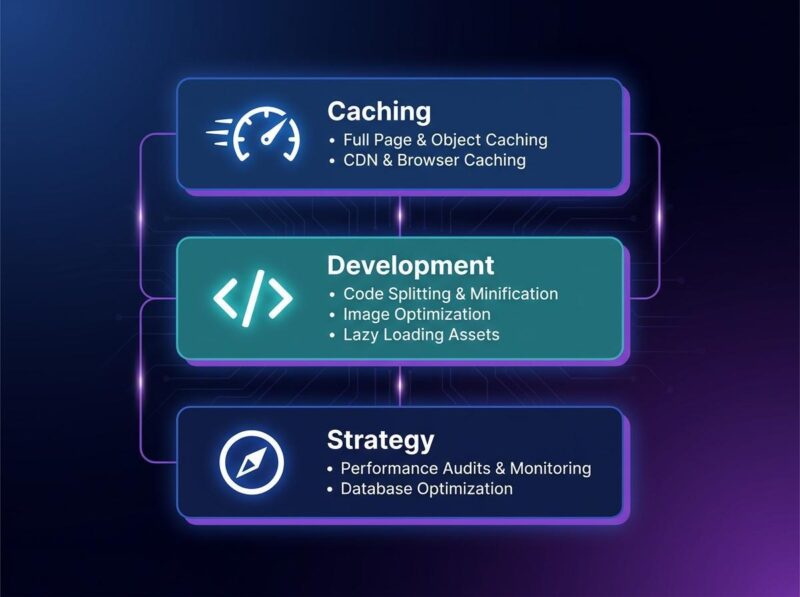 The three-layer model for enterprise WordPress performance: caching, development, and ongoing optimization strategy
Think of WordPress speed as a three-story building. The ground floor is caching (page cache, browser cache, CDN, minification, and Gzip). WP Fastest Cache handles this layer, and for most small-to-medium sites that’s enough.
The second floor is where enterprise performance gets built: clean code, custom theme architecture, database optimization, smart plugin management, and server configuration. Even the best caching configuration can’t fix a site built on bloated code or an inefficient database. That’s where professional development comes in. Working with an enterprise wordpress agency like Quantenwerft ensures the architecture underneath the cache is optimized for speed at scale.
The third floor is strategy: ongoing Core Web Vitals monitoring, SEO alignment, and content delivery optimization. Speed isn’t a one-time configure-and-forget metric. It degrades as plugins update, content grows, and traffic patterns change. A strategic approach keeps all three layers working together. Most site owners focus entirely on the ground floor, assuming a good caching plugin is the whole solution. It’s not. The real gains come from building up all three stories.
Why Caching Alone Falls Short at Enterprise Scale
Caching is brilliant at what it does: serving stored copies of pages to repeat visitors so the server doesn’t have to rebuild them from scratch. But caching can’t fix slow database queries, bloated themes, render-blocking JavaScript, or poor Time to First Byte (TTFB). Those problems live in the code and architecture layers, not the cache layer.
The WP Fastest Cache blog has already made this argument. In their post on the argument that caching plugins and professional development work best together, they explain that relying on a caching plugin alone puts a ceiling on your site’s potential speed. A great cache layer makes repeat visits fast, but the first visit still depends on everything underneath.
The numbers back this up. The average WordPress site runs 34 plugins, according to Grover Web Design’s 2025 Full Benchmark Study. Sites with more than 35 plugins load 23% slower, and that’s with caching enabled. Multiple plugins multiply database queries, add JavaScript and CSS files, and create dependencies that caching alone can’t fully mask. Every extra plugin is another thing your cache has to work around rather than through.
Looking at the HTTP Archive Tech Report from April 2026, the gap is stark. Only 24% of WordPress sites pass Core Web Vitals on mobile. On desktop the number is higher, but it still lags behind sites built on custom frameworks or optimized platforms. Caching is table stakes. You need it, but it won’t win the game by itself.
What the 2026 Data Tell Us About WordPress Speed
 WordPress lags behind other platforms in Core Web Vitals pass rates, per HTTP Archive data through April 2026
The business case for speed has never been stronger. The research from 2024 through early 2026 reveals a clear pattern: faster sites convert better, and the cost of slowness is directly measurable.
Google and Deloitte’s joint “Milliseconds Make Millions” study, published in 2024, found that every 0.1-second improvement in page speed drives 8.4% more retail conversions, 10.1% more travel conversions, and 9.2% higher average order value. Those numbers come from measured data across thousands of real transactions, not lab simulations. The Think with Google research collection documents the full methodology behind these findings.
Shopify’s Store Speed Study from January 2026 found that every 100 milliseconds of slower load time correlates with roughly 3.5% lower conversion rates. Smaller stores feel the impact three times more than larger ones, which means speed is a competitive differentiator for growing businesses. If you’re not an enterprise yet, speed is how you get there.
Akamai’s Online Retail Performance Report established the original benchmark: a 100-millisecond delay reduces conversion rates by 7%. And Google’s own research shows that 53% of mobile users abandon sites that take longer than three seconds to load.
These numbers change how you should think about speed. It’s not a technical checkbox. It’s a revenue driver. The question becomes not “is my site fast enough?” but “how much revenue am I losing to every uncached millisecond?”
The Development Layer: Clean Code, Smarter Architecture
This is where enterprise WordPress agencies earn their keep. The development layer addresses the architectural decisions that determine baseline performance before caching even comes into play.
A custom theme built on a lightweight framework loads significantly less bloat than a commercial multipurpose theme. Efficient database queries reduce query time from hundreds of milliseconds to single digits. Proper image delivery pipelines serve the right size and format for each device. Mobile-first architecture ensures performance on the devices where most of your traffic actually comes from.
WP Fastest Cache’s guide on Core Web Vitals and how to improve them on WordPress covers the measurement side of this equation. The development layer covers the implementation side, specifically the changes that move those metrics. The two go together: you measure with their guide, and you fix with sound development practices.
The difference shows up in the data. WordPress 6.9 improved TTFB by 20-25% across production sites, per testing by 365i published in December 2025 and updated in April 2026. Fresh install TTFB dropped from 82ms to 61ms, and WooCommerce sites went from 287ms to 221ms. But those gains only help if your site’s architecture can take advantage of them. Many sites still run outdated PHP (only 63% are on PHP 8.2 or higher, according to the same Grover Web Design benchmark study). A development agency ensures you’re actually capturing the performance improvements WordPress ships with each release.
The Strategy Layer: Sustained SEO and Performance Optimization
Enterprise WordPress performance requires coordination across caching, hosting, code, and content delivery
Speed is not a one-time fix. Core Web Vitals fluctuate with every content update, plugin change, and traffic spike. A site that passes CWV in March may fail in June after a poorly optimized plugin update or a surge in traffic from a viral post.
The strategy layer treats speed as an ongoing discipline rather than a project with a finish line. This means regular performance audits, competitive benchmarking, SEO alignment, and proactive optimization before metrics degrade. It’s the difference between reacting to problems and preventing them.
For agencies and enterprises that manage multiple WordPress properties, a structured SaaS SEO approach treats site speed as a continuous optimization discipline. The sites that win in search are the ones that maintain performance over time, not just the ones that hit a good score once.
There are practical tactics you can use regardless of budget. WP Fastest Cache’s guide on tips for improving load time on budget hosting covers lightweight themes and optimization approaches that work even on shared hosting. These are useful when you’re managing costs alongside performance. The combination of a lean setup and ongoing monitoring is often enough to keep a small-to-medium site competitive.
Speed Is a System, Not a Setting
The three-layer model isn’t theoretical. It’s the difference between a site that loads okay and a site that generates revenue consistently. Caching handles repeat visits. Development ensures the architecture can deliver fast initial loads. Strategy keeps performance from degrading over time.
If your business depends on WordPress (and in 2026, that’s 43% of the web), the cost of leaving any layer unaddressed is measurable. Every millisecond of unnecessary load time maps to lost conversions, lower search rankings, and visitors who leave before your content loads. The data from Google, Deloitte, Shopify, and Akamai all point the same direction: speed matters at every scale.
Start with a caching plugin. WP Fastest Cache is a strong foundation. But don’t stop there. Audit your development architecture. Build a performance strategy that keeps you ahead of the metrics. Speed is a system, and all three layers need to work.