AI Video Generator From Photo Review: Can PhotoGenerator Turn Still Images Into Engaging Videos?

Why Static Images Are Evolving Into Motion
Static images have always been powerful, but motion often tells a richer story. Over the last two years, image-to-video technology has become one of the fastest-growing segments in generative AI. Industry reports suggest that generative AI adoption continues to expand across creative workflows, with visual content among the fastest-growing applications. As a result, creators are searching for tools that not only generate images but also animate them naturally.
One platform that enters this space is PhotoGenerator. While many people first discover it as an AI Photo Generator, the platform also includes tools that transform still images into short AI-generated videos. Instead of replacing traditional editing software, it focuses on making visual creation faster and easier for everyday users. This review looks at how the platform works, what features stand out, where it still has limitations, and who may benefit most from using it.
Understanding the Platform
More Than an Image Generator
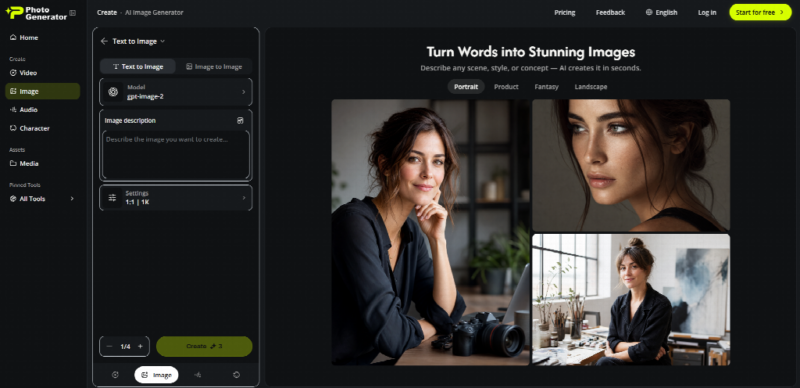
PhotoGenerator combines several AI visual tools inside one workspace. Although many users begin with image generation, the platform also supports transforming existing pictures into animated clips. The workflow focuses on simplicity instead of offering hundreds of editing controls.
Main Features
The platform includes text-to-image generation, image enhancement, style transformation, portrait creation, image editing, AI video generation from photos, multiple artistic styles, and high-resolution exports. This combination allows users to create an image first and then animate it without switching between several different applications.
Core Functions
Like many modern generators, users describe a scene with natural language prompts, and the AI creates original images based on those instructions. Prompt quality still matters because more detailed descriptions usually produce more accurate outputs.
The photo-to-video feature is the main reason many users explore the platform. Instead of producing a completely new video, the AI analyzes an existing image and predicts realistic motion. Depending on the selected effect, the output may include camera zoom, facial movement, hair animation, environmental motion, object movement, and cinematic transitions. Results are generally short clips designed for social media, presentations, or creative storytelling.
Different visual styles also help users experiment without learning advanced editing techniques. Options range from realistic portraits to digital illustrations, fantasy-inspired artwork, and anime-style creations, making the platform suitable for different creative preferences.
Using the Workflow
From Image to Video
The process begins by either uploading an existing image or generating one from a text prompt. Portraits often produce the most convincing animations because facial structures are easier for AI models to interpret.
Animation Settings
After selecting an image, users choose an animation style. Some effects focus on subtle realism, while others create stronger cinematic movement. Once the settings are selected, the AI processes the request, usually much faster than a traditional animation workflow. Processing time depends on image complexity and server demand. When the generation finishes, users can download the finished clip for websites, presentations, or social media platforms.
A Practical Example
Bringing a Travel Photo to Life
Imagine a travel blogger with one high-quality mountain photograph. Instead of publishing only the image, they generate a short animation where clouds slowly move, the camera gently pushes forward, trees sway slightly, and sunlight changes across the landscape. The original composition stays intact while becoming much more engaging. Although the AI does not recreate a full cinematic sequence, the additional movement helps capture attention with very little extra effort.
Evaluating the Results
Visual Quality
One positive observation is that characters usually remain recognizable after animation. Some competing tools occasionally distort facial features during movement, while PhotoGenerator generally preserves identity reasonably well. Complex scenes can still introduce visual artifacts, but this is common among today’s AI animation models.
Motion realism depends heavily on the selected effect. Gentle camera movement and subtle animations often appear more convincing than dramatic action sequences. This limitation reflects the current state of image-to-video technology rather than being unique to the platform.
Prompt responsiveness is another strength. Detailed prompts influence both image generation and animation behavior. Simple instructions can still produce acceptable outputs, but descriptive prompts usually generate more coherent and visually consistent results.
Strengths and Weaknesses
Advantages
One of the platform’s biggest advantages is its accessible interface. Most functions are easy to understand, even for beginners with no editing experience. Users can experiment quickly because changing prompts or animation styles requires only a few clicks.
Another benefit is the integration of multiple creative tools within one workspace. Instead of switching between separate image generators, editors, and animation software, users can complete several creative tasks in one place. This saves time during early-stage content creation and rapid prototyping.
The platform also supports many creative applications, including social media content, product showcases, character concepts, educational materials, marketing prototypes, storyboarding, and personal creative projects.
Limitations
Despite its strengths, PhotoGenerator has several limitations. Generated videos are generally short, so users looking for longer cinematic productions will still need traditional editing software. Highly detailed scenes containing many moving objects may produce less predictable animations, reflecting current AI limitations across the industry.
Even an advanced AI Photo Generator cannot fully replace human creative direction. Experimenting with several prompt variations often produces noticeably better results than relying on a single description.
Who Can Benefit Most?
Suitable Users
Independent creators such as bloggers, designers, and YouTubers can transform static assets into engaging visual content with minimal effort. Small businesses without dedicated creative teams may also find the platform useful for producing marketing materials and product presentations.
Digital marketers can rapidly create visual concepts before investing in larger production budgets. Students and educators can use animated visuals to explain ideas more effectively, while hobbyists interested in generative AI have an accessible way to experiment without learning professional animation software.
The Bigger Picture
Its Place in the AI Market
Image generation and video generation were traditionally separate creative workflows. Platforms that combine both capabilities help reduce friction between idea creation and final presentation. This reflects a broader trend toward integrated AI creative ecosystems.
Professional animation software still provides much greater control, but AI dramatically reduces the time required to create visually engaging content. This allows individuals, freelancers, and small organizations to experiment with ideas that previously required specialized software and advanced technical skills.
Modern content publishing also rewards consistency. Being able to convert one image into multiple animated variations increases content diversity without repeating the entire production process. Rather than replacing creative professionals, tools like PhotoGenerator primarily accelerate brainstorming and early-stage production.
Comparing With Traditional Software
Feature Comparison
PhotoGenerator emphasizes simplicity, accessibility, and speed, while traditional video editing software focuses on precision and extensive creative control. The learning curve is much lower, generation is significantly faster, and installation is unnecessary because the platform operates online. However, users who require frame-by-frame editing and advanced animation techniques will still benefit from professional editing software.
Final Thoughts
PhotoGenerator presents an interesting balance between image generation and AI-powered animation. Rather than trying to replace professional production software, it simplifies the process of transforming still images into short moving visuals that work well for digital content.
Its strongest qualities are ease of use, integrated creative tools, and a workflow that encourages experimentation. The platform avoids overwhelming users with excessive controls, making it approachable for beginners while remaining useful for experienced creators who need rapid prototypes.
There are still limitations. Long-form storytelling, highly detailed action scenes, and frame-perfect editing remain outside the scope of current AI image-to-video systems. Those expectations are better served by traditional editing software.
Overall, PhotoGenerator offers a practical example of how visual AI continues to evolve. For creators who want to explore image animation without investing significant time in complex production tools, it provides a straightforward workflow while demonstrating how the boundary between photography and video is becoming increasingly fluid.

