
Beyond Brittle Selectors: Scaling Web Test Automation with Resilient Locators and Modern Orchestration

In modern software engineering pipelines, code is delivered faster than ever. Continuous integration (CI) environments run automated suites hundreds of times a day to guarantee release stability. Yet, as front-end codebases scale, many QA teams find themselves trapped in a vicious cycle of maintenance: test suites that passed on Friday are broken on Monday.
More often than not, the culprit is not a functional bug, but a stale selector. Writing fragile queries against volatile HTML structures is the single largest contributor to test flakiness, costing engineering teams up to 40% of their sprint capacity in debugging time.
To build a sustainable quality strategy, teams must master two core disciplines: writing highly resilient locator scripts and managing their test execution in a centralized control room.
⏱️ TL;DR: Quick Quality Strategy Check
- The Flakiness Trap: Relying on technical HTML attributes (IDs, CSS classes, XPaths) turns UI changes into test landmines.
- The Playwright Solution: Shift to user-centric, accessibility-first queries (getByRole, getByLabel). This ensures tests only break when the business logic actually fails.
- The Orchestration Gap: Local green builds are useless if buried in CI logs. Bridging manual QA with automated test runs requires a specialized, modern hub.
1. Locators Battleground: Playwright vs. Cypress vs. Selenium
To understand why automated suites fail, we must look at how different automation frameworks interact with the Document Object Model (DOM). The way a tool queries, waits for, and asserts elements determines its stability under rapid deployment cycles.
Here is an objective comparison of how the three leading automation frameworks handle web element locating:
| Metric / Capability | Selenium WebDriver | Cypress | Playwright |
| Primary Locator Style | Technical (ID, Class, XPath, CSS) | Command-chained CSS selectors | User-centric (Roles, Labels, Placeholders) |
| Auto-Waiting Engine | Manual: Requires explicit or implicit wait declarations. | Semi-Automatic: Waits for elements to exist in DOM, but struggles with animation lag. | Fully Automatic: Checks for actionability (visibility, stability, enablement) before executing actions. |
| Shadow DOM Support | Complex: Requires deep shadow-root traversal via JS executors. | Configuration-based: Requires global or local includeShadowDom flags. | Native: Pierces Shadow DOMs by default without extra selector syntax. |
| iFrame Traversal | Manual Switch: Requires explicit driver.switchTo().frame() context switches. | Plugin-dependent: Requires custom wrappers or manual window object manipulation. | Seamless: Uses page.frameLocator() to interact with elements inside frames directly. |
Historically, Selenium relied on absolute XPath or nested CSS paths (e.g., /html/body/div[2]/form/input[1]). While this works in static environments, it acts as a landmine during active deployment.
Cypress improved this with chained retries, but it was Playwright that shifted the paradigm to accessibility-first selectors. By focusing on how a real human interacts with the screen rather than how a developer structured the HTML, modern playwright locators have made end-to-end tests incredibly resilient to UI layout refactoring.
📋 Best Practices for Framework Selection:
- Pick Playwright if your app relies heavily on Web Components, Shadow DOMs, complex iFrame structures (like Stripe payment checkouts), or if you run massive parallel test suites.
- Pick Cypress if you have a developer-centric setup where the frontend team writes component tests in the same repository.
- Avoid Selenium for New Projects unless you are bound by legacy enterprise requirements or need to support ancient web browser versions.
2. Handling Complex UI: Inputs, Frames, and Dynamic Elements
When writing enterprise-grade scripts, standard CSS selectors fail when dealing with complex elements like dynamic dropdowns, third-party payment iFrames, or nested shadow trees.
Playwright’s locator engine solves this by prioritizing explicit user roles. Instead of targeting .btn-primary or #submit-2983-dynamic, you target the element’s accessibility interface:
// ❌ Brittle CSS Selector – breaks if a designer changes the class or markup structure
await page.click(‘div.login-form > button.btn-primary’)
// ✅ Resilient User-Centric Locator – only breaks if the actual user flow changes
await page.getByRole(‘button’, { name: ‘Log in’ }).click()
When dealing with third-party payment widgets (such as Stripe or PayPal) that load inside secure iFrames, traversing the DOM manually is painful. By utilizing a stable playwright locator anchored to a frame locator block, engineers can write clean, readable code that bypasses context switching:
// Interacting with an input inside an iFrame seamlessly
const creditCardFrame = page.frameLocator(‘#stripe-card-iframe’);
await creditCardFrame.getByPlaceholder(‘Card number’).fill(‘4242 4242 4242 4242’);
By decoupling test scripts from dynamic markup, automation engineers spend their time covering new features rather than fixing yesterday’s broken locators.
💡 Takeaway on Selector Resiliency:
Always prioritize query mechanisms in this order: getByRole() ➔ getByLabel() ➔ getByPlaceholder() ➔ getByText(). Only fall back to CSS/XPath selectors or getByTestId() when targeting highly dynamic, custom-drawn elements (like Canvas charts) where the accessibility DOM lacks standard roles.
3. Evaluating Leading Test Management Systems for Hybrid Teams
While finding elements on a page is an execution problem, tracking their overall impact on product quality is an orchestration problem. If automated test results are buried inside raw CI console logs, business stakeholders remain blind to actual coverage.
To bridge this gap, modern teams deploy Test Management Systems (TMS) to synchronize manual checklists with automated runs.
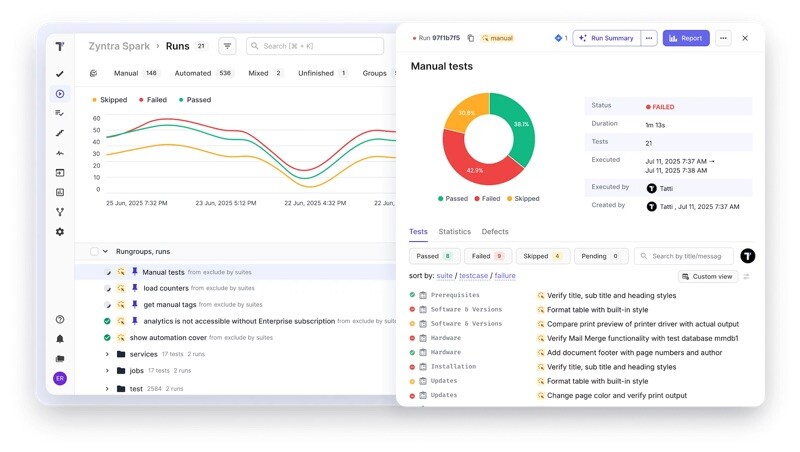
Here is how the market’s leading tools compare:
TestRail (The Legacy Standard)
- Pros: Highly secure, compliant with strict enterprise audit requirements, and offers complex permission controls.
- Cons: Traditional, form-based UI that slows down fast-moving Agile sprints. Automation synchronization is low, relying on custom script wrappers to upload JUnit XMLs via APIs separately.
Xray for Jira (The Atlassian Plugin)
- Pros: Native to Jira. Developers, PMs, and QAs work inside the same workspace.
- Cons: Storing thousands of automated test cases as individual Jira tickets clutters the project backlog and significantly degrades Jira’s performance at scale.
Qase (The Lightweight Manual TMS)
- Pros: A very fast, modern single-page application experience with clean manual test case authoring.
- Cons: Lacks deep out-of-the-box CI/CD orchestration. Requires manual configuration and custom API lifting to handle complex automation pipelines.
Testomat.io (The Modern Hybrid Hub)
- Pros: Designed specifically for teams transitioning from manual to automated QA. Features a markdown-first visual editor, a native CLI that scans your repository and maps code to manual scripts instantly, and built-in AI failure analytics.
- Cons: The markdown-first, text-centric approach has a slight learning curve for manual testers who prefer classic step-by-step click forms.
The Automation-First Advantage
For teams looking to scale, choosing the right test management tool is what prevents automated testing from becoming a black box.
With Testomat.io, the synchronization is completely automated. Using a native CLI, it scans your codebase, imports your Playwright, Cypress, or Selenium suites, and links them straight to manual requirements in Jira. When a test fails in your CI pipeline, it doesn’t just show a raw terminal log—it clusters the failed stack traces, flags flaky runs, and suggests the exact broken selector to fix, bridging the gap between engineers and product owners.

The Takeaway
High-velocity delivery requires a fundamental shift in how teams approach quality assurance. By transitioning from layout-dependent, brittle selectors to accessibility-driven locators, you drastically reduce maintenance overhead.
However, local green builds are only half the battle. To unlock absolute visibility, teams must centralize their manual checklists and automated test runs in a high-performance orchestration system. The right tooling strategy ensures that testing remains an engine of release confidence, rather than a bottleneck.