Explainer Video with MCP: A Developer’s Guide

Explainer Video with MCP: A Developer’s Guide
An explainer video with MCP is not a chatbot feature that happens to return an MP4. It is a distributed job workflow. An AI client gathers the source material, calls typed tools, receives stable identifiers, waits for terminal state, and hands the result back to a human or another system.
That distinction matters. A demo can hide latency, duplicate requests, weak permissions, and missing logs. A production integration cannot. If the agent spends credits or uploads internal files, the workflow needs the discipline you would apply to any external service.
This guide explains the developer-facing design: the minimum tool surface, asynchronous state, retry safety, permission boundaries, and a real README-to-video test.
Why Explainer Video Becomes an Integration Problem
The rendering model is only one component. A useful explainer video starts with source material and ends with a reviewable artifact. Between those points, a system may need to:
- Check that the account is ready.
- Upload a README, product page, screenshot, PDF, or script.
- Create a video job with constrained settings.
- Track the job without holding one request open indefinitely.
- Retrieve a preview or download.
- Request a bounded edit while preserving the rest of the video.
MCP gives an AI client a standard way to discover and call those operations. The video engine still performs the generation. The model decides when a tool is useful, the MCP server validates the call, and the underlying service executes it.
In other words, MCP is the adapter, not the renderer.
This makes video creation available where the context already exists. A coding agent can read a specification, changelog, API example, or pull request and prepare an explainer without copying material across browser tabs. It also creates risk: the agent now has access to data and actions.
Start with a Small, Typed Tool Surface
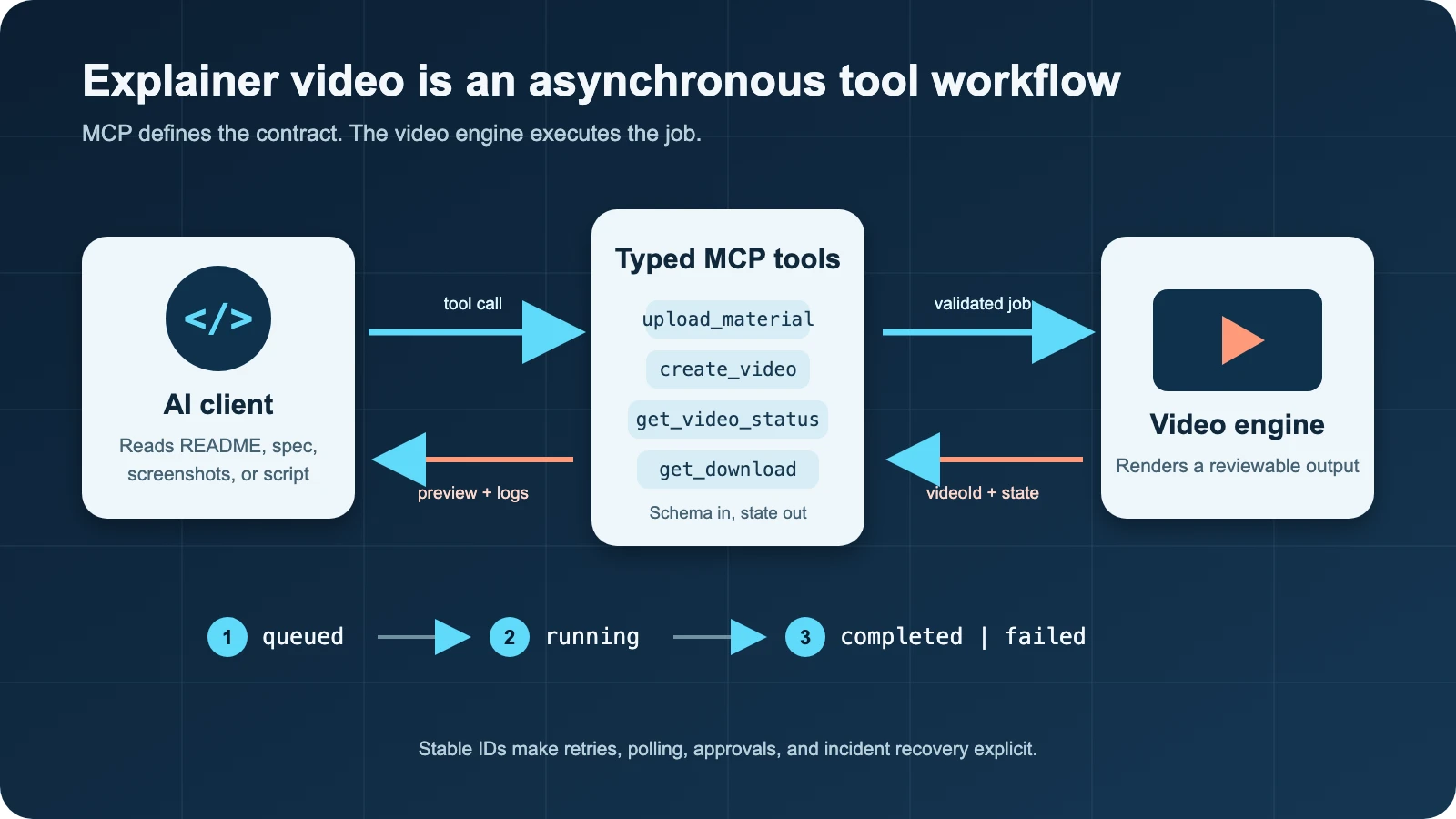
Figure 1. MCP is the contract between the AI client and an asynchronous video engine.
A video MCP server does not need one giant make_video tool with twenty optional fields. It also does not need hundreds of thin wrappers around every internal endpoint. A practical surface can follow the lifecycle of the asset:
| Tool | Responsibility | Side effect |
| get_account | Check plan or available capacity | Read only |
| upload_material | Register source material | Writes an asset |
| create_video | Start a generation job | Spends resources |
| get_video_status | Read progress and terminal state | Read only |
| edit_video | Request a scoped revision | Spends resources |
| get_video_download | Prepare an export | Creates a downloadable output |
I verified this six-tool shape against TapVid’s live MCP endpoint on Aug 16, 2026. The names are less important than the boundaries. Each tool has one job, and an operator can reason about which calls are safe to auto-approve.
Input schemas should be narrow. If aspect ratio supports 16:9 and 9:16, expose an enum. If captions are on or off, do not accept arbitrary prose. Descriptions should explain what each parameter controls because the client uses them to choose and populate a tool.
Structured results matter just as much. A creation call should return an opaque videoId and a state such as queued. A status call should return progress, a terminal state, and a machine-readable failure where possible. The model can explain those values to a person, but orchestration code should not need to scrape them from prose.
Model Video Generation as an Asynchronous State Machine
Video jobs are long-running operations. Treating them as synchronous creates two bad choices: keep a request open for minutes, or let the client time out without knowing whether the server accepted the job.
A better contract returns quickly:
{
“videoId”: “opaque-id”,
“status”: “queued”,
“pollAfterSeconds”: 5
}
The client then calls a read-only status tool until it sees a terminal state:
type VideoState = “queued” | “running” | “completed” | “failed”;
interface VideoStatus {
videoId: string;
status: VideoState;
progress?: number;
errorCode?: string;
}
The state machine is simple, but the edge cases are not.
First, a timeout is an unknown outcome. If create_video times out after the server persisted the job, repeating the call may create a duplicate and spend credits twice. Use an idempotency key when the service supports one. If it does not, stop and reconcile through a list or status operation instead of blindly retrying.
Second, polling should be boring. Honor a server-provided interval, use backoff when appropriate, add jitter across many workers, and stop at a terminal state. A progress value that remains unchanged is not proof that the job is dead.
Third, separate protocol errors from execution errors. An invalid schema should fail immediately. A valid job that later fails during rendering should keep its job identity and return an execution failure through status. Those cases require different remediation.
The pattern is already visible across developer video tools. Hera returns a video_id for polling. VideoGen exposes wait controls and execution IDs. Vivideo documents bounded waits that may time out and be called again. Durable identity beats a long, fragile request.
A Real README-to-Explainer Run

Figure 2. Frame from the generated test video showing explicit terminal states.
To test the workflow, I wrote a short Markdown source called “Async Job Queue Explained.” It defined six points: request validation, a durable job_id, queued and running states, terminal states, idempotency_key, and basic observability.
The input was intentionally technical. It included a TypeScript interface and asked the generator to preserve these identifiers verbatim:
job_id
idempotency_key
queued
running
completed
failed
The run used a 30-second, 16:9 English video with captions. The prompt requested code-style labels and diagrams, prohibited avatars and invented performance numbers, and limited the explanation to the uploaded source.
The upload returned a material identifier. The create call returned a queued video identifier in about two seconds. Status polling then showed the job move from queued to running, with progress reported separately from the creation response.
The job reached completed 10 minutes and 43 seconds after creation and the account meter recorded 90 credits used. It stayed at a reported progress of 0.5 for several polls before finishing, which is a useful reminder that progress is service telemetry, not a timer. This was one observed run, not a performance benchmark. I did not retry the creation call, and the same video identifier was used for every status check.
The exported file was 32.13 seconds long, 1280 by 720 pixels, with H.264 video and AAC audio. It covered the requested queue, worker, terminal-state, polling, retry, and logging concepts. The visual review also found illustrative details that were not in the README, including an example S3 path and an error token. They did not change the core explanation, but they demonstrate why “generated” should mean “ready for review,” not “ready to publish.”
The test also produced a small client-side error during evidence collection. I named a shell variable status, which is read-only in zsh. The video job was unaffected because the error happened after a read-only status response, and I resumed polling with a different local variable. It is a mundane failure, but that is the point: orchestration code fails independently of the remote job. Stable identifiers let the two sides recover without starting over.
For a broader look at how planning, tool calls, review, and editing fit together, see TapVid.
Put Approval Boundaries Around Side Effects
The MCP tools specification treats tools as model-controlled, but a client can and should let a human deny calls. A useful permission policy classifies operations by consequence:
- Read-only calls such as account checks and status polling can usually run automatically.
- Uploads may expose internal source material and deserve workspace-level rules.
- Creation and editing consume credits, so show the settings and require approval when cost or volume is material.
- Download is usually low risk, but the destination and retention policy still matter.
- Publishing should be a separate tool, if it exists at all, and should require explicit approval.
Do not put an API key in a prompt or tool argument. Keep credentials in the client configuration or an authorization flow, scope them to the smallest useful environment, and validate authorization on every call. A natural-language request is not an authorization boundary.
Separate generation from publication. Let the agent create a draft, then have a person verify narration, on-screen text, asset matching, and legal language before any explicit distribution action.
Make the Workflow Observable
When a job goes wrong, “the agent tried to make a video” is not a useful incident report. Log the integration like any other distributed system.
At minimum, record:
- A request or trace ID generated by your application.
- The MCP tool name and schema version.
- The returned material and video identifiers.
- State transitions with timestamps.
- Poll count and total elapsed time.
- The selected duration, aspect ratio, language, and caption mode.
- Credit usage when the service returns it.
- A machine-readable error code and a redacted human message.
Do not log secrets or sensitive source contents by default. Hashes, asset IDs, sizes, and content types are often enough. If an output uses the wrong screenshot or changes a protected number, source and prompt lineage make it debuggable.
MCP or REST API?
MCP and REST solve different interface problems, and many systems should offer both.
Use MCP when an AI client needs to discover capabilities, select tools, and act on context already present in a conversation or coding workspace. It is a good fit for interactive workflows such as “turn this README into a draft explainer, then show me the result.”
Use a REST API when your application owns a fixed production pipeline, needs deterministic request construction, processes high volume, or relies heavily on webhooks and service-to-service controls. A scheduled batch job should not require a model to rediscover the same call sequence every time.
Both interfaces can share the same services and job records, keeping state, quotas, and outputs consistent.
If you want to inspect a concrete implementation path, this explainer video engine shows how the workflow can be exposed to both application code and AI assistants.
Production Checklist
Before connecting an agent to an explainer video workflow, verify the following:
- Tool schemas use enums, required fields, and clear descriptions.
- Creation returns a stable job identifier immediately.
- Status is read-only and reports terminal failures explicitly.
- Create and edit calls have an idempotency strategy.
- Polling honors server guidance and has a client-side deadline.
- Credentials are scoped and never placed in prompts.
- Credit-spending and publish-capable tools require appropriate approval.
- Logs connect source version, prompt, tool call, job state, and output.
- The final video is reviewed against the original assets and exact claims.
- REST remains available for deterministic, high-volume automation.
Frequently Asked Questions
Does MCP generate the explainer video?
No. MCP standardizes how an AI client discovers and calls tools. The connected video service performs the upload, generation, editing, status tracking, and export operations.
Should a video MCP tool wait until rendering is finished?
Usually, creation should return a stable identifier quickly. The client can poll a read-only status tool or use a bounded wait. This avoids fragile, multi-minute requests and makes recovery clearer.
Is MCP a replacement for a video REST API?
Not necessarily. MCP is useful for agent-driven, context-aware interaction. REST is often better for deterministic application pipelines and batch workloads. Both can share the same backend and job model.
Final Takeaway
The interesting part of explainer video with MCP is not that a prompt can produce a file. It is that a conversational client can participate in a controlled software workflow.
Keep the tools narrow. Return stable IDs. Treat timeouts as unknown outcomes. Separate read-only operations from credit-spending and publishing actions. Log enough state to reproduce the result. With those pieces in place, video generation stops being a fragile demo and starts behaving like an integration you can maintain.
Gate receipt
| Check | Evidence | Result |
| English article length | 1,989 words | PASS |
| Heading structure | One H1; H2/H3 hierarchy | PASS |
| Primary keyword | Present in first sentence | PASS |
| TapVid links | Two homepage links per publisher brief | PASS |
| Unsupported claims | Sources separated from single-run observations | PASS |
| Hands-on evidence | Stable run ID, settings, timing, result, failure, output review | PASS |
| Media | Cover, architecture figure, run frame, playable MP4 | PASS |
| Style lint | No em dash or en dash in article body | PASS |