
How To Cache A Video Generator File From Seedance 3 AI

Static cache files and video files leave the server as different requests. A seedance 3 AI Video Generator export does not become fast because the HTML around it was cached. The page can return in a blink while the mp4 is still coming down a second connection. If you only watch the HTML timer, you will call the page fast and the visitor will still wait on the clip.
The plugin’s own page describes the job in plain terms. It writes static cache files so a visit does less PHP and fewer database queries, then serves that cached page. The comparison table beside those claims lists desktop cache, mobile cache, minify for HTML, CSS, and JavaScript, gzip, browser caching, image optimization, WebP conversion, lazy load, and cache logs you can delete. A video-file row is not in that list. Treat the absence as the brief. The cache covers the document. The clip is a media URL you still have to place, size, and request on purpose.
A Cached Page And A Video File Take Different Paths
Open the network panel on a page that already has a cache file and one embedded clip. You should see the document come from the cache path, and the mp4 come from the media path, often with a different timing bar. That split is the whole lesson. Speeding up the document does not shrink the video. Combining CSS, delaying a script, or converting a photo to WebP can make the chrome of the page lighter. None of those rows replaces the bytes of the clip.
Site owners lose time here in a specific way. They publish, run a speed test, see a better HTML score, and ship a hero that still weighs as much as a short film. The rework is a second afternoon of compressing, moving the file, and clearing the page so the test is not scoring yesterday’s markup. Do the file decision before the test, or the test will congratulate the wrong thing.
What The Plugin Actually Says It Caches
Read the feature table as a boundary, not as a menu of hopes. Desktop and mobile cache mean the HTML can differ by device and still be a static file. Minify and combine apply to the markup and the scripts. Gzip and browser caching apply to what those files already are. Image optimization, WebP, and lazy load are listed with the pictures. Delete-cache logs are listed so you can see and remove cache records. Nothing in that published grid says an mp4 is stored as the page.
Static Files Cover The HTML Request
A static file is a copy of the page as HTML, ready to send without rebuilding the post from the database. When the embed code changes, that copy is stale until it is replaced. The visitor who hits the old file still receives the old markup, even if the new mp4 is already in the media library. The clip and the document fail separately. You can have a new video and an old page, or a new page and a video URL that 404s. Check both. A single green score will not show you which of the two is wrong.
Lazy load, as listed, is a reason to keep heavy pictures off the first paint. It is not a documented promise that a video tag will wait. If you need the clip to wait, put it where a click or a lower position fetches it, and do not assume the lazy-load row did that work for you. WebP is the same kind of limit. It changes images. It does not transcode the mp4.
How To Export A Short File Before You Embed
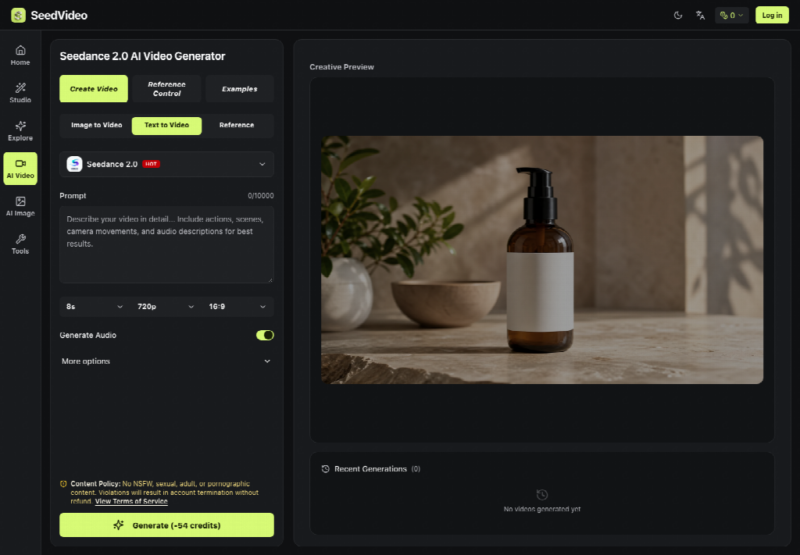
Make the file first, on a short setting, and only then touch the post. SeedVideo is an independent studio for this export. The workbench offers Text to Video, Image to Video, and Reference. The FAQ tells you to choose Seedance 3.0, upload references, write the prompt, set ratio and duration, and generate. A guide page on the same site can load with Seedance 2.0 suggested. Those two lines disagree, so the chip on the control wins. You need an account before the workbench will generate, and new accounts are offered trial credits. Trial credits are not the same thing as a finished campaign file. Read what the control will spend before you promise the post a clip.
Read The Model Name On The Control
The page title can say one model while the selector shows another. Write down the name on the selector, the ratio, and the duration you actually set. The wide default on the workbench is 16:9. If the post is a narrow column, crop or choose the ratio before you generate, because a wide file letterboxed into a thin theme is how a hero becomes a tall empty gap. Duration is whatever that model’s control offers. Do not borrow a second model’s second-count and type it into the post as if it were a guarantee.
Keep the prompt short enough that you can check it against the picture you wanted. The box allows a very long entry. A long entry is how a product shot grows extra labels. One subject, one move, and the words that must not change. Then use the four moves the pages actually describe.
- Upload the still or the short reference that has a single job. Add audio only if the post needs that rhythm locked to the picture.
- Write the scene in the prompt and set ratio and duration on the controls in front of you. Leave extra moods out.
- Read the credit number on the generate control. Generate only if that number is one you accept for a test, not for a guess.
- Download the file. The studio describes a Seedance 3.0 download from SeedVideo as watermark-free. A clean file can still be the wrong picture, so watch it once before it goes into the media library.
If the letters on a product, or a face you needed to keep, come back wrong, reject the file and do not upload it. A cached page will cheerfully serve a bad embed. The cache is not a review. You are.
Put The Clip Where The First View Can Wait

Host the mp4 in the media library so the video URL is yours, then point the post at that URL. A seedance 3 AI Video Generator file is still just a file at that point. Give it a width that matches the column, and keep it out of the first screen if the post can still be understood from the headline and the text. Autoplay in the hero is how a cached document stays “fast” in one metric while the browser starts a large download the visitor did not ask for.
Poster image and file size are the two checks that belong to the theme, not to the cache plugin. A poster lets the page paint a still while the mp4 waits. A shorter, lower-resolution export is the lever you still hold, because the plugin’s WebP row will not shrink the video. If the first test file is already heavy, do not embed a longer one and hope gzip will save you. Gzip is listed for the text assets. Video bytes are already compressed in a way gzip does not usefully repeat.
Clear That Page Cache After The Embed Changes
Change the embed, then assume the static file is wrong until you replace it. The product creates cache files and lists cache logs you can delete. Use that pair. Remove the cached copy of this URL so the next view writes a file that includes the new video tag. If you only replace the mp4 at the same URL, the HTML might still be fine, and you can skip a full clear. If you changed the tag, the poster, or the position, the HTML changed, and the old static file will keep serving the old tag.
Do this before you announce the post. The failure mode is a logged-in editor who sees the new embed, and a logged-out visitor who still receives the cached document from before the change. Those are different requests. The time you lose is the hour of comments saying the video is missing, while your own browser, which skipped the cache, plays it without trouble.
Check The HTML Hit And The Video Request
After the new cache file exists, load the URL in a private window. Confirm the document is the cached page, then confirm the media URL returns the file you uploaded. Pause on the first second of the clip and compare it with the still you meant to animate. If the picture drifted, take the embed out and clear the page again. Leaving a wrong clip in a fast page is how a cache win becomes a content miss.
Run the speed check only after those two requests look right. A score taken against a page with no video, or against a page whose video URL errors, will not describe the post you are about to share. Note the file size next to the score so the next edit does not “improve” the number by deleting the clip and calling that a cache victory.
Leave The Cache Fast And The Clip Optional
Reload the public URL and watch the document and the mp4 as two lines. SeedVideo fits this job when you needed a short file, you accepted the credit number on the control, and you are willing to host that file yourself. The cache plugin fits the HTML around it. It does not become a video host because the export was clean.
If the clip is wrong, publish the page without it and keep the static file small. A fast document with an honest still beats a cached page that spends the visitor’s first seconds on a picture you would not have shipped.