10+ WordPress Exit-Intent Wins Most Stores Miss

Someone is about to leave your store. Mouse heading for the close button. You have maybe half a second to show them something worth stopping for. And what do most WordPress stores do with that moment? A 10% discount popup. Same one for everybody. That is not exit intent working. That is exit intent wasting a perfectly good moment.
And we are going to fix that. We will show you why most WordPress stores blow the exit intent and 11 things you can do with that leaving-moment that go way past the generic discount code.
What Is Exit Intent?
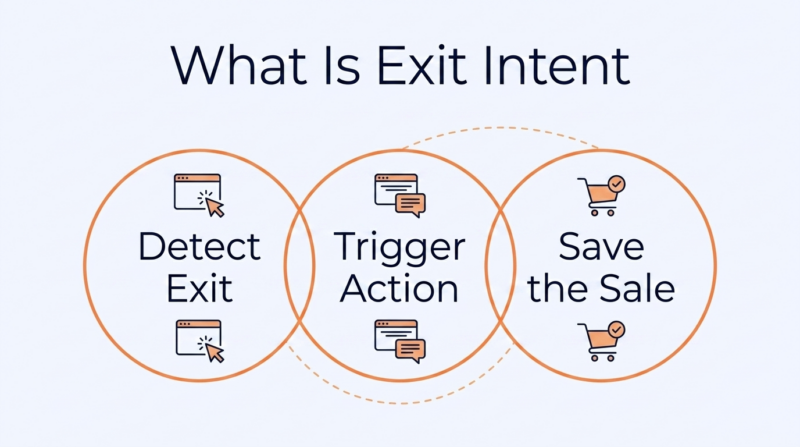
Exit intent picks up on when somebody is about to leave your site. On desktop, it watches the mouse. When the cursor drifts toward the upper page boundary (address bar or the close button), the system fires, usually a pop-up. On mobile, it tracks scroll-up patterns and back-button taps since there is no cursor to follow.
Exit intent technology has become one of the more widely used tactics in digital marketing for retaining visitors. The whole point is to catch people right as they are walking out and give them a reason to stay around.
Most WordPress stores use it for a discount code. That is fine as a starting point. But there are at least 11 better things you can do with that half-second window – and barely anyone tries them.
Why Most WordPress Stores Get Exit Intent Wrong: 4 Key Reasons

According to Baymard Institute, the average cart abandonment rate is 70.22% across 50 studies. And the most recent 2025 number from Uptain puts it at 71.72%. That is roughly 7 out of 10 people who put something in their cart and then just… leave. Exit intent is supposed to help with that. For most stores, it doesn’t, because the setup is not right.
1. Showing the Same Popup to Every Visitor Regardless of What They Did on the Site
Somebody who browsed two product pages and somebody with $300 in their cart are in totally different places mentally. Hitting both of them with the same “Get 10% off!” popup wastes the cart visitor’s moment and overpays for the browser’s attention.
The popup needs to respond to what the person actually did, not show the same thing to everyone whose mouse moves upward.
2. Firing the Exit Intent Popup Immediately Before the Page Has Even Finished Loading
Some plugins show the popup the second the page loads. Before anyone has read a word. That is not catching someone who’s leaving – that is annoying someone who just arrived. The website visitor hasn’t formed any opinion worth responding to yet if they haven’t spent at least 15-30 seconds on the page.
3. Ignoring Mobile Device Users Because Traditional Exit Intent Only Tracks Mouse Movement
Desktop exit intent watches cursor position. Phones don’t have a cursor. Most basic popup plugins only handle the desktop side and show nothing to mobile visitors.
Since mobile is where most eCommerce traffic comes from, that is a big portion of your target audience getting zero exit treatment. The newer tools track scroll patterns and idle time on mobile to identify exit behavior, but you have to turn that on.
4. Adding Exit Intent Plugins Without Checking the Impact on Page Load Time
Every popup plugin loads its own JavaScript. Some bring in jQuery. Some pull custom fonts and animation libraries. On a WordPress site already running 20+ plugins, that extra weight hits your page speed directly. If the exit intent plugin adds 300ms to your load time, you might be pushing more visitors away with slow pages than you are saving with the popup.
11 High-Converting WordPress Exit-Intent Strategies You Should Be Using
Every one of these best practices goes past the default discount popup. Different triggers, different audiences, different moments in the shopping trip.
1. Show a Shipping Threshold Reminder Instead of a Generic Discount Code
Your store does free shipping at $75. The cart is at $52. Instead of flashing a 10% coupon, the popup says “You’re $23 away from free shipping.” That costs you nothing in margin. It bumps up the order value. And it responds to the shopper about what is actually happening in their cart right now, which is why it works way better than a random discount code.
Best For:
- Stores with free shipping thresholds between $50-$150
- Product categories where tossing in one more item is easy
- Stores where shipping cost is a top reason people ditch the cart
Quick Setup: Pull the current cart total with WooCommerce cart hooks and calculate the gap on the fly. Only show it when the cart is within 40% of the threshold.
2. Trigger a Different Exit Popup for Cart Pages vs Product Pages
Someone leaving a product page is still looking around. At that stage, they are weighing several factors before deciding which option best meets their needs. Someone leaving the cart page was about to pull the trigger. Those two people need completely different messages.
Product-page popup? Show related items or a price-match guarantee. Cart-page popup? Hit the specific reason they are hesitating – shipping cost or return policy. Running the same popup on both pages treats two very different moments like they are identical.
Best For:
- WooCommerce stores with multi-step checkout flows
- Stores where product pages and cart pages have different bounce patterns
- Any store running more than 500 monthly sessions on the cart page
Why It Works: Cart-page abandoners buy at 2-3x the rate of product-page abandoners because they already picked what they wanted. The cart abandonment popup just needs to knock down the last objection.
This page-specific approach matters even more for B2B and industrial metalwork sites where different pages serve completely different purposes. A capabilities page, a certifications page, and an RFQ form page attract visitors with very different questions. And the exit intent on each should match.
But most of them run a single generic “contact us” popup (if they run one at all) on every page. This means the exit intent popup is trying to save a visit the site was already losing.
For shops where the website isn’t built to convert industrial buyers in the first place, working with a marketing agency for fabrication and metalwork to get the pages right is the step that makes exit intent actually worth adding.
This way, you can build capability pages structured around the specific questions procurement teams ask during vendor evaluation. Once the pages are doing their job, a page-specific exit popup on each one (RFQ prompt on the capabilities page, downloadable cert packet on the certifications page) starts producing real leads instead of bouncing visitors who never found what they needed.
3. Offer a One-Click Wishlist Save Instead of Asking for an Email Address
Not everybody is ready to buy. Not everybody is ready to hand over their email either. But they might save the product for later if it takes one click. A wishlist save as the exit action skips the form entirely while keeping the visitor tied to the product. If they made an account, you can run a “your wishlist is waiting” email marketing campaign later.
Best For:
- High-ticket products where people research for days before buying
- Fashion and home decor stores where browsing is half the fun
- Stores with lots of repeat visitors who come back three or four times first
4. Display Social Proof From the Exact Product Category the Visitor Browsed
A popup saying “1,247 people bought this month” means nothing. One saying “Sarah from Austin bought the same jacket you were looking at – 3 hours ago” means something. When the social proof comes from the exact category the visitor was browsing, the popup becomes personal. It hits because the proof matches what they already cared about.
Best For:
- Stores with 100+ orders per month (enough data to show real proof)
- Product categories where seeing what other people bought changes user behavior
- Brands where trust is a sticking point (supplements and skincare especially)
Niche eCommerce stores like this golf cart lift kits store selling specialized gear get the biggest lift from category-level proof because their buyers are already deep in research mode before they even show up. Nobody is impulse-buying here. They have been comparing options for days.
An exit popup on their combo pages showing “4 buyers this week picked this same 14-inch wheel for their EZGO RXV” does way more than a generic “popular item” badge. It matches the exact product type and cart model the person was already researching.
Telling a leaving buyer that other people with their exact setup chose this option is the kind of proof that turns an exit into a sale on pages where the purchase decision takes real thought.
5. Use Exit Intent to Open a Live Chat Prompt, Not Just a Static Popup
Sometimes people aren’t leaving because they don’t want the product. They are leaving because they had a question and nobody answered it. A chat prompt as the exit action gives them a way to get that answer without hunting for a contact page. Works especially well on product pages where specs or compatibility are part of the decision.
Best For:
- Stores selling technical products where buyers have spec questions
- High-ticket items where the purchase needs a human push
- Service businesses where the “product” needs explaining before people buy
One Thing: Only fire the chat prompt when somebody is actually available to respond. A “chat now” popup at 2 am that leads to a “leave a message” form hurts more than it helps.
6. Show a Back-in-Stock Notification Signup for Out-of-Stock Items
Visitor lands on a product page. Sees “Out of Stock.” Leaves. Without exit intent, that person is gone for good. With it, you catch them on the way out and ask if they want a heads-up when the item comes back. That is a warm lead that would have vanished completely. And the popup only fires on out-of-stock pages, so it doesn’t bother anyone else.
Best For:
- Stores with seasonal inventory or limited-run products
- Brands that frequently sell out on popular items
- Any store where out-of-stock pages still get meaningful search traffic
7. Present a Bundle Deal That Includes the Item Already in the Cart
Someone has a $40 item in their cart. You can offer a bundle with a complementary product for $55. The exit popup becomes an upsell, not a discount. It feels like a deal because they are getting more for a small increase in price. And since the bundle includes what they already picked, it is relevant instead of random.
Best For:
- Stores with natural product pairs (phone case + screen protector)
- Consumable brands where bundling drives repeat orders
- Any store where average order value is a primary growth number
Pro Tip: This bundling approach works for signup flows too, not just product carts. When someone is about to abandon a registration or listing process, the exit popup can show the full package of what they would get by finishing instead of offering a price cut.
A service like this business listing platform could use this approach on their signup page. A business owner lands on the listing page, sees the price, and starts to leave. Instead of discounting the listing, the exit popup could surface the full bundle of included services – professional ad copywriting and multi-platform promotion alongside a buyer guarantee.
The visitor was focused on the number. The popup reframes the conversation around what that number actually gets them.
For any WordPress site where the conversion is a signup rather than a cart checkout, showing the bundled value at the exit moment works better than cutting the price because the visitor leaves thinking about what they’d miss out on instead of what they would save.
8. Run Exit Intent Only on First-Time Visitors and Skip Returning Customers
A repeat customer who has bought from you three times doesn’t need a popup asking for their email. They gave it to you already. Showing them the same exit offer they have seen on their last four visits just wears them out.
Use cookies or logged-in status to spot returning visitors and either skip the popup entirely or show them something different – like a sneak peek at new arrivals or a loyalty reward they didn’t know about.
Best For:
- Stores with strong repeat purchase rates (consumables and subscriptions)
- Brands where returning visitors make up 30%+ of total traffic
- Account-based stores where you can check login status
What to Show Instead: Returning visitors respond way better to “new arrival” previews and loyalty point reminders than discount codes. The relationship already exists – the popup should act like it knows that.
9. Delay the Exit Intent Trigger Until the Visitor Has Spent at Least 30 Seconds on the Page
A visitor who bounces in 3 seconds was never going to buy anything. Showing them a popup just piles a bad experience on top of a bad experience. Waiting 30 seconds means the popup appears for people who actually read something, scrolled through the images, maybe checked the price. Those visitors are worth saving. The 3-second bouncers are not.
Best For:
- Content-heavy product pages where time on page means real interest
- Stores with high bounce rates where most exits are under 10 seconds
- Any site where popup fatigue is already a problem from firing too early
10. Use Exit Intent After Checkout to Capture Referrals or Post-Purchase Upsells
Exit intent doesn’t have to stop at the cart. After someone finishes buying and gets the thank-you page, they are about to close the tab in a good mood. That is the best possible moment to ask for a referral or show a one-time add-on. “Know someone who’d like this? Share and they get 15% off” turns a done purchase into a new customer without spending a dollar on ads.
Best For:
- Stores where word-of-mouth already drives some sales (gifts and specialty items)
- Subscription brands where referral programs bring a real share of signups
- Any store where customer acquisition costs keep climbing
The thank-you page is also where many businesses lose sight of the customer journey. An online purchase might be the last interaction you can measure, even though the customer’s long-term value depends on whether they return. That missing piece makes it harder to decide whether the next interaction should encourage another purchase, a referral, or something else entirely.
For businesses that also serve customers in person, loyalty platforms like BonusQR help fill part of that gap by tracking return visits and purchase frequency after the initial transaction. That additional context can make post-checkout decisions more informed.
For example, if repeat visits are uncommon, a referral prompt may create more value than promoting another purchase. If customers tend to return regularly, introducing a loyalty reward on the thank-you page may be the more relevant follow-up.
Looking at post-purchase behavior alongside checkout data makes those decisions based on actual customer patterns rather than assumptions.
11. Optimize Page Speed Before Adding Any Exit Intent Plugin to Your Store
This one isn’t a popup trick – it is a requirement. Every exit intent plugin adds JavaScript. Some add a lot. If your WordPress site already takes 4+ seconds to load, adding another plugin that runs scripts on every page makes the speed problem worse. A slow site causes more exits than any popup can recover.
Best For:
- Every WordPress store – no exceptions
- Sites running 20+ plugins where each new one adds load time
- Stores where Core Web Vitals are hurting search rankings
Do This First: Clear stale cache, set up HTTPS properly, minify your CSS and JS, and get load time under 2.5 seconds. Then add the popup plugin. Not the other way around.
| Win | When to Trigger | What to Show |
| Shipping threshold | Cart page exit, cart below threshold | Dynamic gap to free shipping |
| Page-specific popup | Different popup per page type | Objection-specific content |
| Wishlist save | Product page exit, no cart activity | One-click save button |
| Category social proof | Product page exit after 30+ seconds | Recent buys in same category |
| Live chat prompt | Product page exit during hours | Chat with support |
| Back-in-stock | Out-of-stock page exit | Notification signup |
| Bundle deal | Cart exit with qualifying item | Bundle with cart item |
| First-time only | New visitor exit (cookie-based) | Welcome offer or email capture |
| 30-second delay | Exit after minimum time on page | Any – filters instant bouncers |
| Post-checkout | Thank-you page exit | Referral or add-on upsell |
| Speed first | Before adding any popup | Not a popup – a prerequisite |
Conclusion
You get one shot at a leaving visitor. Most stores spend it on a discount code that everyone has seen before, and nobody cares about. The 11 moves in this article treat that exit moment differently depending on what the person actually did. That is what separates exit intent that converts from exit intent that gets closed before the visitor even reads it.
We built WP Fastest Cache to make sure your WordPress site loads fast enough for exit intent to actually matter. Over 1.5 million stores run it. It handles minification and lazy loading alongside GZIP compression and WebP, with a near-one-click setup. Try WP Fastest Cache now.